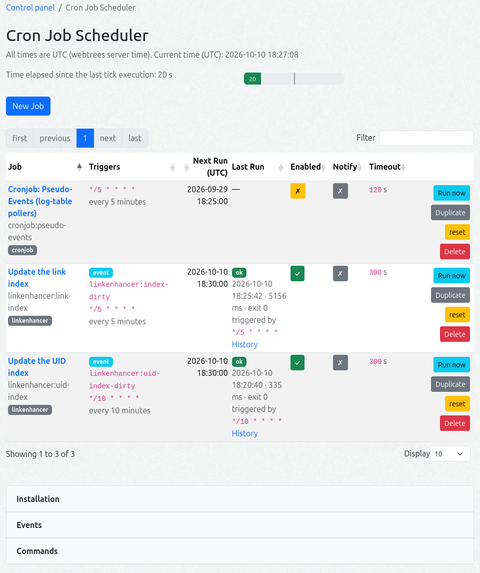
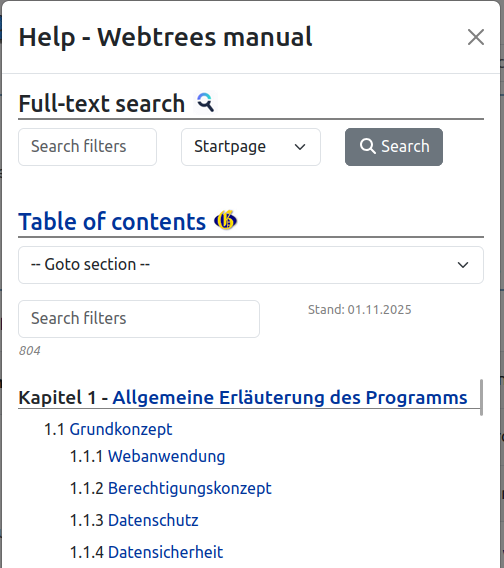
flowchart LR
    WT["`🏗 **webtrees Core**<br/>2.2 / 2.3`"]

    subgraph modules_v4["📦 modules_v4"]
        LE["🔗 LinkEnhancer"]
        CJ["⏰ Cronjob"]
        WS["📚 wt-shared-libs"]
    end

    WT -->|Module API| LE
    WT -->|Module API| CJ
    LE -->|PSR-4 Autoload| WS
    CJ -->|PSR-4 Autoload| WS

    LE -->|"cron-jobs.php<br/>(Manifest)"| CJ
    CJ -->|executes| CLI["🛠 LE CLI scripts<br/>build-link-index<br/>build-uid-index<br/>refresh-wthb-toc"]

    classDef coreStyle fill:#e3f2fd,stroke:#1565C0,stroke-width:2px
    classDef leStyle fill:#e8f5e9,stroke:#2E7D32,stroke-width:2px
    classDef cjStyle fill:#fff3e0,stroke:#E65100,stroke-width:2px
    classDef wsStyle fill:#f3e5f5,stroke:#7B1FA2,stroke-width:2px
    classDef cliStyle fill:#f5f5f5,stroke:#616161,stroke-width:1px

    class WT coreStyle
    class LE leStyle
    class CJ cjStyle
    class WS wsStyle
    class CLI cliStyle
1 - Cronjob
Cron job scheduler service for webtrees
A cron job scheduler service for webtrees: schedule maintenance/batch jobs with standard cron expressions, watch their run history in the admin UI, and trigger them manually. The module is the service; the OS (classic cron or a systemd timer) only has to call one small script once per minute.
Job registry + run history in two own tables (cj_job, cj_run)
Admin UI (control panel): job list, create/edit form, run history, run now, enable/disable, delete
Isolated execution: every job runs as a separate child PHP process (proc_open, no shell), with per-job timeout and captured output
Self-registration: other modules can advertise their jobs (a cron-jobs.php
manifest or a getCronJobs() method); they appear here, created disabled and ready to enable
Event-driven jobs: jobs can fire on events instead of a schedule — queued by a token-protected webhook, by a direct EventQueue::push() call from other modules, by the built-in pseudo-event pollers, or by route events
Failure notification: per-job opt-in to alert the site’s administrator accounts when a job fails
Offline awareness: while data/offline.txt exists the tick is skipped before any database access
No core changes, no changes to other modules
It was originally developed as a support module for LinkEnhancer to keep its indexes up to date.
Support
Issues: for any ideas you have, or when finding a bug you can raise an issue.
A trigger: classic cron, a systemd timer, a Windows Task Scheduler task, or the built-in watch daemon (no OS timer needed — see “Trigger installation”)
1.1.2 - Installation
Step-by-step installation and trigger setup
Copy the module folder to modules_v4/cronjob/ (ZIP install works too). The cron library ships inside the module — nothing to fetch.
Open webtrees once (any page as an admin) so the module’s boot() creates its tables.
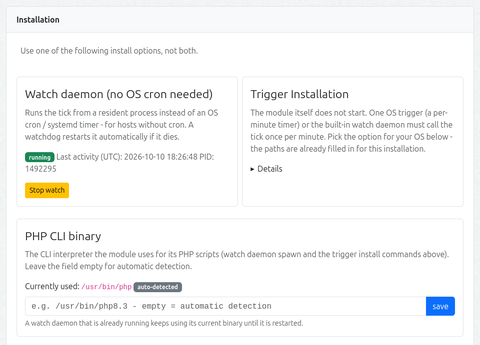
Install the trigger (classic cron, systemd timer, or Windows Task Scheduler — the module’s admin page generates the block for your OS with the paths of this installation already filled in).
Trigger installation (once) — see below.
Create your first job in the admin UI or configure and activate registered jobs.
Trigger installation (once)
Important — PHP CLI binary: the admin page’s Installation accordion shows which PHP CLI interpreter is currently resolved (badge: auto-detected / manual path) and lets you pin a manual path. The chosen binary is used for the watch daemon spawn and in all generated trigger commands.
It is important to check whether your web server provides a PHP-CLI binary (SAPI) and whether the module is configured correctly to use it. Otherwise, tick will not work.
The tick is designed to run every 60 seconds. It makes an inventory of cron jobs, commands and events, triggers events and processes the task queue.
Pick one of the options shown in the module’s admin page:
Option A — classic cron
One line in the web server user’s crontab, runs every minute:
# /etc/systemd/system/cronjob-tick.timer[Unit]Description=Run the webtrees cronjob tick every minute[Timer]OnBootSec=1minOnCalendar=*:*:00Persistent=true[Install]WantedBy=timers.target
Click Start watch on the admin page. A resident process runs the tick every 60 seconds, and a page-load watchdog respawns it if it dies. Use it when the host has no cron and no systemd access, or for testing — on Windows hosts this is the simplest option.
stateDiagram-v2
    [*] --> Stopped: (initial)
    Stopped --> Running: Start watch (Admin-UI)
    Running --> TickLoop: tick every 60 s
    TickLoop --> TickLoop: run job
    TickLoop --> Dead: ⚠ process dies
    Dead --> Running: 🔄 Watchdog respawn<br/>(next page load<br/>Cooldown 5 min)
    Running --> Stopped: Stop watch
    Dead --> Stopped: Stop watch<br/>(no respawn)

    note right of Running
        🔒 holds data/cronjob/watch.lock
        🆔 PID visible in Admin-UI
        🛡 survives FPM-Worker-Recycle (setsid)
    end note
Option D — Windows Task Scheduler
The admin page generates the XML with paths already filled in. Save it as wt-cronjob-tick.xml (UTF-8) and run schtasks /Create /F /XML wt-cronjob-tick.xml once in an elevated prompt.
1.1.3 - Admin settings
Webtrees module settings
Since this is a service module, the only way to access its functions is through the module settings page. Strictly speaking, the only settings available are:
the optional path to the PHP CLI binary (if it is not automatically detected) and
the option to enable additional debug logging in the error log.
Event catalog
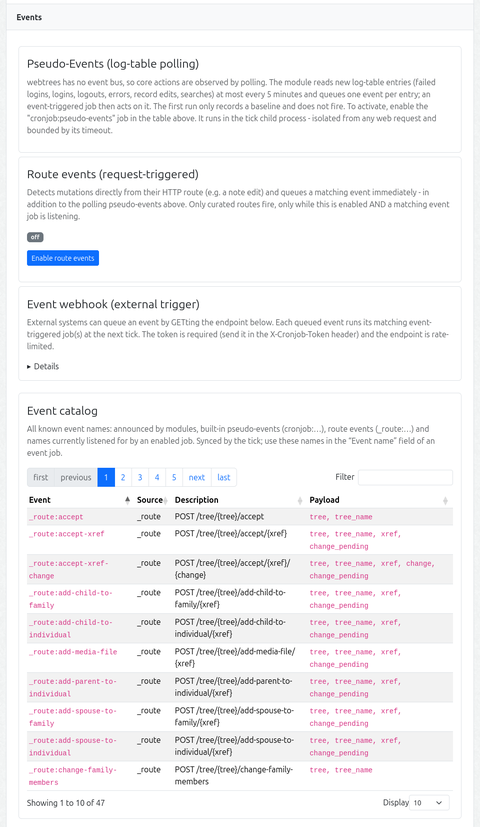
The admin page (Events section) and the job form’s event-name suggestions are fed by an event inventory (cj_event_catalog, synced by the tick like the job registry). It merges, in this priority order:
eventsannounced by modules (manifest events section / getModuleEvents()), namespaced <module>:<name>
route events (_route:*, derived from the live route table)
event names currently listened for by an enabled event job (source listening) — this covers webhook-only names
Each entry carries its source, a description (stored as a translation key, translated at render time only) and the known payload parameter names. For route events the payload is derived from the route path: the {param} placeholders in the order they appear, with {tree} expanding to tree + tree_name (mirroring what the live event payload carries). For pseudo-events both come from the detector (description() / payloadKeys()). The full list is also what the “Event name” datalist in the job form offers. The catalog is rendered as a client-side DataTables (sort/filter/paging) in the Events section.
Command catalog
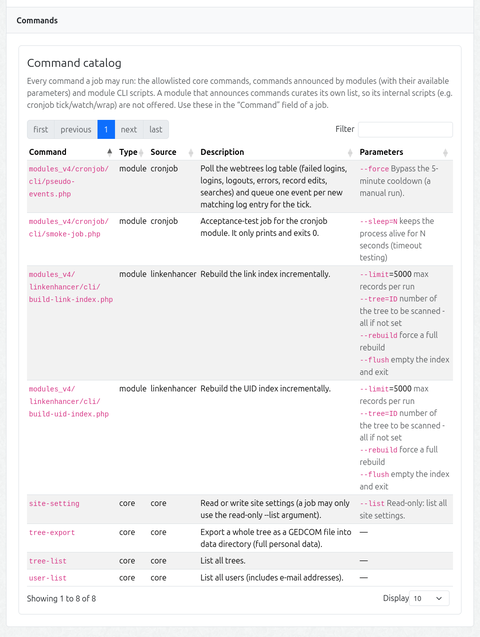
The job form’s command suggestions and the admin page (Events section) are fed by a command inventory (cj_command_catalog, synced by the tick like the others). It merges, in this priority order (first source wins per command):
the allowlisted core commands (tree-export, tree-list, user-list, site-setting), with their known parameters
commands announced by modules (manifest commands section / getModuleCommands()) — with a description and structured parameters
module CLI scripts found by glob (modules_v4/<module>/cli/*.php), except for a module that announced commands (that module curates its own list, so its internal scripts are not offered)
Each entry carries its type (module / core), its source, a description (translation key, translated at render time) and the available parameters (structured: name, optional, default, description). In the job form, entering a command that matches an announced command shows its parameters as a hint under the field.
Failure notification
A job can be marked Notify on failure. When such a job fails (non-zero exit or timeout), the site’s administrator accounts are alerted through webtrees’ own MessageService::deliverMessage() — which delivers via the internal message system and/or e-mail according to each recipient’s own contact-method preference. No addresses are stored in the module and no channel is hardcoded: the recipients are the admin user accounts, and how they are reached follows the site’s messaging settings.
The notification carries the job name, status, exit code, duration and a short tail of the captured output. It runs in the tick (no web request), so it carries no link beyond the text. A notification problem never breaks the tick.
1.2 - Usage
Creating jobs, run history, and the admin UI
Creating a job
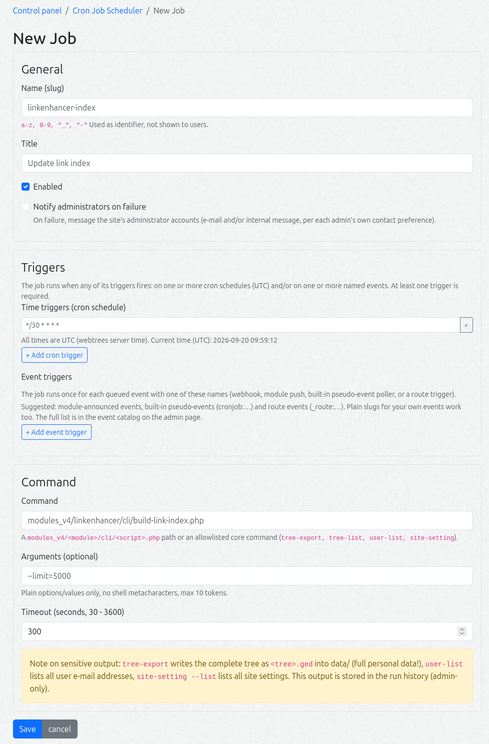
Control panel → Cron Job Scheduler → New Job:
Field
Meaning
Name (slug)
technical identifier, a-z 0-9 _ -. Read-only for module-offered jobs (their <module>:<name> key is fixed); editable for jobs you create yourself.
Title
human readable name
Triggers
one or more time triggers (cron schedules) and/or event triggers — the job fires when any trigger fires. At least one is required.
Cron expression
(time trigger) standard 5-field cron or a macro (@daily, @weekly, …). Times are UTC.
Event name
(event trigger) the event this job reacts to. Slug or <domain>:slug, max 64 chars.
Command
a modules_v4/<module>/cli/<script>.php path or an allowlisted core command.
Arguments
plain options/values only (e.g. --limit=5000), max 10 tokens
Timeout
30 - 3600 s
Notify on failure
opt-in: alert the administrator accounts when this job fails
Available event names and commands are provided as datalists to make data entry easier.
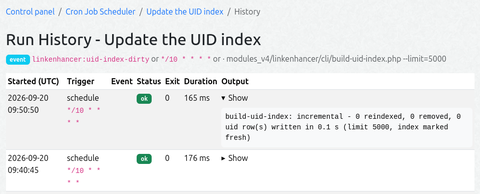
The Run now button queues the job for the next tick (≤ 60 s). The History page shows status, exit code, duration, the trigger that fired the run, and the captured output (last 64 KB) of the last 25 runs per job (plus a 30-day global retention window).
The job table is a client-side DataTable (search box, sortable columns, paging, state saved in the browser). The Enabled and Notify columns can be toggled in place. Per row: Duplicate (opens the create form prefilled) and Reset (restores module-offered defaults).
1.3 - The Tick
How the once-a-minute tick schedules and runs jobs
The tick is the heart of the module: once a minute it looks at every enabled job, decides what is due, and runs it. Neither the webtrees core nor the operating system does any scheduling itself — they only start tick.php
.
flowchart TD
    subgraph Triggers["`⏱ Triggers *(once per minute)*`"]
        CRON["`🕑 OS cron / systemd<br/>*every minute*`"]
        WATCH["`👁 watch daemon<br/>*(in-module)*`"]
    end

    subgraph Guard["🛡 Guard"]
        TP["`📄 cli/tick.php · **cron:tick**<br/>*guard(): 403 over HTTP*`"]
        OFF{"`⚠ site offline?<br/>*data/offline.txt*`"}
        BOOT["`🚀 boot()<br/>*webtrees + DB*`"]
    end

    subgraph Selection["🔎 Select work"]
        TIME["`📅 time-based jobs<br/>**next_run_at due** *(UTC)*`"]
        CE[("`📦 cj_event<br/>*event queue*`")]
        DRAIN["`🧮 drain queue<br/>*coalesced · 60 s budget*`"]
    end

    subgraph Execution["`⚙ Execution *(isolated child)*`"]
        RUN["`🧪 JobRunner<br/>**proc_open**`"]
        LIM["`⏲ timeout 30–3600 s<br/>last **64 KB** · exit code`"]
    end

    subgraph Storage["💾 Storage"]
        CJRUN[("`cj_run<br/>*run history*`")]
        MARK["`🏷 tick.last<br/>*stale > 300 s → tick_stale*`"]
    end

    CRON --> Guard
    WATCH --> Guard
    TP --> OFF
    OFF -->|"offline"| SKIP["⏭ skip tick"]
    OFF -->|"online"| BOOT
    BOOT --> TIME
    BOOT --> DRAIN
    CE --> DRAIN
    TIME --> Execution
    DRAIN --> Execution
    RUN --> LIM
    LIM --> CJRUN
    BOOT --> MARK

    classDef sourceStyle fill:#e3f2fd,stroke:#1565C0,stroke-width:2px
    classDef queueStyle fill:#fff3e0,stroke:#E65100,stroke-width:2px
    classDef tickStyle fill:#e8f5e9,stroke:#2E7D32,stroke-width:2px
    classDef execStyle fill:#fce4ec,stroke:#C2185B,stroke-width:2px
    classDef storageStyle fill:#f5f5f5,stroke:#616161,stroke-width:1px

    class CRON,WATCH sourceStyle
    class OFF,CE queueStyle
    class TP,TIME,DRAIN tickStyle
    class RUN,LIM execStyle
    class CJRUN,MARK,SKIP storageStyle
What starts a tick
Pick one trigger (once):
OS cron — * * * * * from the webtrees root (see Installation).
systemd timer — the generated unit from the module’s admin page.
watch daemon — the in-module resident process that re-launches tick.php
every 60 s and survives FPM worker recycling (Installation, which also carries the daemon’s lifecycle diagram).
All three run the same command: php modules_v4/cronjob/cli/tick.php cron:tick.
What one tick does
Guard — CliBootstrap::guard() answers 403 if the script is ever reached over HTTP; then CliBootstrap::boot() loads webtrees + the database.
Offline check — if data/offline.txt exists the tick is skipped entirely, before any database access — e.g. during a webtrees update, when schema and code are in flux.
Select the work — two sources, combined in one pass:
time-based jobs whose next_run_at has passed (cron schedules, UTC); the due triggers are computed against the last run (or the job’s creation, for never-run jobs).
event jobs — the cj_event queue is drained oldest-first, coalesced to one run per event name, within a 60-second wall-clock budget. Event jobs receive the event name and payload via the CRONJOB_EVENT / CRONJOB_EVENT_PAYLOAD environment. See the event pipeline.
Run each job in isolation — JobRunner validates the command (a modules_v4/<module>/cli/<script>.php path, or one of the four allowlisted core commands; at most 10 argument tokens) and launches it as a child process with a hard timeout (30–3600 s). Only the last 64 KB of output are captured; a job that hits its timeout is killed (proc_terminate) and reported as exit -9.
Record — every run is written to cj_run (status, exit code, duration, the trigger that fired it, captured output) — this is the run history. Event-triggered runs are additionally linked via cj_event_run.
Marker — the tick writes data/cronjob/tick.last. If that marker is older than 300 s, the module reports itself as tick_stale in the admin status.
Manual runs
You can also run the tick by hand for debugging — --dry-run, --job=<name>, --strict and --full-output are described on the CLI scripts page. Note that --full-output may expose personal data, so only use it where the output destination is trusted.
1.4 - Events
Event-driven jobs, webhooks, pseudo-events, and route events
flowchart TD
    subgraph Sources["📡 Event Sources"]
        WH["`🔗 Webhook<br/>**GET + Token**`"]
        DC["`📞 Direct Call<br/>**EventQueue::push**`"]
        PE["📋 Pseudo-Events<br/>Log table poller"]
        RE["🔀 Route-Events<br/>POST on mutating routes"]
    end

    subgraph Queue["⏳ Queue"]
        CE[("`📦 cj_event<br/>**DB Queue**`")]
    end

    subgraph Tick["`⏱ Tick *(every 60 s)*`"]
        MATCH["Match events<br/>coalesced: 1 per name"]
        BUDGET["`⏲ **60 s** wall-clock budget`"]
    end

    subgraph Execution["⚙ Execution"]
        JOB["`Job script<br/>child process via **proc_open**`"]
        ENV["🌐 CRONJOB_EVENT<br/>CRONJOB_EVENT_PAYLOAD"]
    end

    subgraph Storage["💾 Storage"]
        RUN[("cj_run<br/>run history")]
        ER[("cj_event_run<br/>link")]
    end

    WH --> Queue
    DC --> Queue
    PE --> Queue
    RE --> Queue
    CE --> Tick
    MATCH --> BUDGET
    BUDGET --> JOB
    JOB --> ENV
    JOB --> RUN
    JOB --> ER

    classDef sourceStyle fill:#e3f2fd,stroke:#1565C0,stroke-width:2px
    classDef queueStyle fill:#fff3e0,stroke:#E65100,stroke-width:2px
    classDef tickStyle fill:#e8f5e9,stroke:#2E7D32,stroke-width:2px
    classDef execStyle fill:#fce4ec,stroke:#C2185B,stroke-width:2px
    classDef storageStyle fill:#f5f5f5,stroke:#616161,stroke-width:1px

    class WH,DC,PE,RE sourceStyle
    class CE queueStyle
    class MATCH,BUDGET tickStyle
    class JOB,ENV execStyle
    class RUN,ER storageStyle
Besides time-based schedules, a job can be triggered by an event. webtrees has no event system, so events are plain DB rows (a small cj_event queue) that the tick drains once a minute. An event-triggered job runs for a queued event whose name matches its Event name — coalesced: per tick at most the newest event of each name is drained (one run per name per tick), and the name’s older pending duplicates are dropped — a burst of identical events never queues a burst of job runs (job scripts are idempotent/incremental by convention).
Naming scheme (analogous to job names). Event names are slugs (a-z 0-9 _ -, max 64 chars total), optionally namespaced <domain>:<slug>:
Form
Meaning
plain slug (e.g. index-dirty)
your own events — webhook or direct EventQueue::push()
cronjob:<slug>
built-in pseudo-events (log-table pollers)
_route:<slug>
route-triggered events (see below)
<module>:<slug>
events announced by a module (see “Announcing events”)
Queuing an event has four sources:
Webhook (external systems). GET the endpoint shown in the admin page (section “Event webhook”): GET /module/_cronjob_/Event?event=<name>&data=<json> with the token in the X-Cronjob-Token header. data is an optional JSON object, stored with the event. The endpoint requires the token, is rate-limited (20/min per site), and only accepts events while the module is enabled. It is a GET, not a POST: webtrees rejects POSTs without a session CSRF token, which an external caller cannot send.
Direct call (your own modules). From PHP code in another module: \Schwendinger\Webtrees\Module\Cronjob\Services\EventQueue::push('index-dirty', ['tree' => 'X']); — this requires the cronjob module to be installed; guard it with class_exists('Schwendinger\Webtrees\Module\Cronjob\Services\EventQueue').
Pseudo-events (built-in pollers). webtrees has no event bus, so core actions (logins, failed logins, logouts, record edits, errors, searches) are observed by polling the webtrees log table. Enable the offered cronjob:pseudo-events job and the module reads the new log entries at most every 5 minutes, queueing one event per entry.
Route events (built-in, request-triggered). A curated set of mutating editor routes under /tree/{tree}/ (record-specific routes with {xref} in the path, plus a small tree-level allowlist) queues its event immediately, right inside the request that made the change.
The tick matches each pending event against the enabled jobs that carry an event trigger for that name (a job can have several event triggers, or none at all), runs them, then marks the event handled (consumed once — even on failure, so a failing job does not re-run the same event forever). The drain is bounded: it takes the newest event per name (coalescing, see above) and stops after a 60 s wall-clock budget, so a saturated queue cannot starve the rest of the tick — the remaining events simply continue with the next tick. Every consuming run is additionally linked to the event in the cj_event_run cross table (an event can trigger several jobs), and the run history shows which event triggered a run. Handled events are purged after 7 days (their cj_event_run links are removed by the FK cascade); events with no matching job are discarded so the queue does not grow.
Event payload in the child process. Event runs hand the event to the job script via the process environment (the argv is reserved for the job’s static, strictly validated arguments):
Variable
Set when
Value
CRONJOB_EVENT
every event run
the event name (doubles as the “this is an event run” marker)
CRONJOB_EVENT_PAYLOAD
event run with a non-empty payload
the event payload as JSON (route parameters, log-table entries, webhook data)
$event= getenv('CRONJOB_EVENT'); // false on schedule / manual runs
$payload= json_decode((string) getenv('CRONJOB_EVENT_PAYLOAD'), true) ?: [];
$xref=$payload['xref'] ??''; // e.g. from a _route:* event
Variable absent = no payload. The payload is truncated to 4000 bytes when the event is queued; a JSON cut mid-way no longer decodes, in which case CRONJOB_EVENT_PAYLOAD is not set at all (never empty, never broken JSON).
Treat the payload as untrusted input — above all for webhook data, whose sender is external. Validate values (xrefs, names, …) before using them.
The payload is independent of the command type: module CLI scriptsand core commands (which simply ignore the variables) both work on event runs.
The payload is also visible in the run history (event detail), independent of the child process.
1.4.1 - Pseudo-events
log-table polling
webtrees has no event bus, so core actions (logins, failed logins, logouts, record edits, errors, searches) are detected by polling the webtrees log table (app/Log.php, table log) and firing an event per new matching log entry. It is off by default: nothing runs until you enable the offered cronjob:pseudo-events job.
Built-in events (one cj_event per new log row, payload = the row):
Event
Log filter (log_type, message prefix)
Fires when
cronjob:log-auth-failed
auth, Login failed
a login attempt failed (wrong password, unknown user, unverified, not approved, no session cookies)
cronjob:log-auth-login
auth, Login:
a user logged in
cronjob:log-auth-logout
auth, Logout:
a user logged out
cronjob:log-error
error, –
an exception was caught and logged (the message is the trace)
cronjob:log-edit-update
edit, Update:
a record was updated (GedcomRecord::updateRecord())
cronjob:log-edit-delete
edit, Delete:
a record was deleted (GedcomRecord::deleteRecord())
cronjob:log-search
search, –
a search ran (one log row per searched tree)
Payload:log_id, log_time, log_message (truncated to 250 characters, UTF-8-safe) plus gedcom_id / user_id when the log row carries them. The message prefixes are the hard-coded English strings of the current core; a core update that changes them silently stops the matching event (no fallback by design) — the event catalog descriptions and the test-pseudo-events suite pin the current mapping.
How it runs
One trigger, one cooldown. Detection runs only from the offered cronjob:pseudo-events job (*/5 * * * * by default), in the tick’s child process — isolated from any web request and bounded by the job’s timeout, so a heavy detector can never block or slow down a page load. A 5-minute cooldown (a data/ mtime marker) plus a lock keep repeated runs cheap and idempotent; the cooldown also caps a more frequent job cron.
Enabled by the job, gated per event. Enabling the cronjob:pseudo-events job turns detection on (there is no separate switch — the tick only runs enabled jobs). A detector whose event no enabled event-triggered job listens for is skipped entirely — no query, no push.
Checkpoint + backpressure. Each detector remembers the highest log_id it processed (state file). At most 200 rows are fired per run per detector; the checkpoint advances only as far as the last fired row, so a flood is drained over several runs — no data loss, only latency.
Baseline on first run. The first detection only records the current max log_id and fires nothing, so enabling the job does not retroactively fire on existing data. (Re-listening to a previously unlistened event catches up its backlog, capped as above.)
Reset, not re-fire, on table shrink. If the table shrank below a checkpoint (TRUNCATE / DB restore — plain row deletions cannot do this, MySQL auto-increment continues after deletes), the detector re-baselines silently.
Offline-safe & isolated. Skipped while data/offline.txt exists; a broken detector never breaks the others; detection is serialized (flock) and state is persisted atomically to data/cronjob/pseudo-events.json.
The log table is the source of truth: under a flood the tick’s coalescing runs a job once per event name per tick with the newest payload — older rows are not re-delivered, but they stay in the log table, and log_id in the payload lets a job that needs completeness re-read the range itself.
If an event name vanishes, the admin table flags such triggers with the unknown event badge.
Detected events go into the same cj_event queue as webhooks and are consumed by the tick’s normal event drain. To act on one, create an event-triggered job whose Event name matches (e.g. alert on cronjob:log-auth-failed, re-index on cronjob:log-edit-update).
1.4.2 - Route events
request-triggered
A complementary, immediate detection mechanism: instead of polling state on a schedule, the module observes the HTTP request itself. When a request to a mapped mutating route has been handled successfully (2xx/3xx), it queues the matching event into the same cj_event queue — a listening event job then reacts at the next tick (~60 s), with no polling latency.
Which routes are mapped — two rules, both derived from the live webtrees route table. Common prerequisites: path starts with /tree/{tree}/, the handler is in webtrees’ request-handler namespace (RequestHandlers in 2.2.6, Controllers in 2.3), and the request is a POST mutation. In 2.2.6 this is enforced at map time (GET page routes are not mapped); in 2.3 the route carries no HTTP method, so the POST check happens at fire-time and the GET form-load of the same route is ignored.
Record routes (rule-based — core updates are picked up automatically): the path contains {xref} (the target record) and the handler class name starts with Edit, Delete, Add, Create, Link, Paste, Reorder or Pending. The event name is the third path segment, namespaced _route:<segment>; when several mapped routes share a segment (delete, edit-raw, accept, reject), the following path parameters are appended, hyphen-separated.
Tree-level routes (small curated allowlist): the significant tree-wide mutations that carry no {xref} in the URL (import, merge, renumber, …). Each allowlist entry has an explicit event name. New tree-wide mutations in a core update need a module update (the record-route rule stays fully automatic).
In total 38 events (27 record routes + 11 tree-level routes). The payload always contains tree (id) + tree_name plus all matched route parameters. Record routes (with {xref}) additionally carry change_pending (bool): whether the change is still pending in the change table after this request (the user’s auto-accept preference is off) or already applied (auto-accept on). A pending change is applied when an admin accepts it — which fires its own _route:accept* events. Tree-level routes write directly (no change rows) and carry no such flag.
Breaking change (this version). Record routes without{xref} in the URL — all _route:create-* events plus _route:add-unlinked-individual — are no longer mapped: they carry no target record. Jobs listening to those events will never fire again; the admin table flags such triggers with an unknown route event badge (a generic check over all jobs’ _route:* triggers against the live map), so re-pointing them is visible instead of silent.
_route:accept* / _route:reject* fire when a pending change is accepted or rejected — accepting a pending deletion is when the record is actually removed.
How it works
Gated twice, off by default. An event fires only while the admin toggle “Route events” (Events section) is on and at least one enabled event-triggered job listens for that event name. A request that is not mapped costs nothing (one in-memory lookup); only a successful request on a mapped route does two tiny indexed DB reads.
Transactional. The cj_event insert runs in the same DB transaction as the mutation (the module middleware sits inside webtrees’ request transaction), so the queued event commits or rolls back together with the change — no drift, no double fire on a failed save.
Never blocks. Detection runs after the handler, is exception-wrapped, and can never alter the response.
Robust to core upgrades. The map is rebuilt from the route table (keyed by handler class strings, no ::class), so a renamed/removed handler simply stops matching instead of fatalling. If the route table is not available (e.g. CLI), a static fallback map with the note route keeps the pilot working. The record-route rule is fully automatic; only the small tree-level allowlist is curated (see above), and jobs pointing at an event that no longer exists — a removed route event or a removed built-in pseudo-event — are flagged in the admin table (unknown event badge).
To act on one, create an event-triggered job whose Event name matches (e.g. _route:update-record) and enable the “Route events” toggle. Note the overlap with the cronjob:log-edit-update / cronjob:log-edit-delete pollers: every record edit/delete is also written to the log table, so the matching log event follows at the next poll as well — pick the mechanism whose latency/precision fits the job (route events are near-instant and precise per object, and carry change_pending; log pollers lag ~5 min but also catch changes made outside the web UI).
1.5 - Howto
How can other custom modules make use of this cronjob module?
You can query information about the status of the service or managed jobs.
And it is possible to register own CLI scripts to be managed and executed by this service. Details can be found in the following sections.
1.5.1 - Service API
Using the cronjob service from other modules
Neighboring modules query the module’s state through a stable, read-only facade
(CronjobService) instead of its internal services. Check availability first -
the module may not be installed, and the class is only autoloadable when its
module.php
has been loaded:
<?php
use Schwendinger\Webtrees\Module\Cronjob\Services\CronjobService;
if (class_exists(CronjobService::class) && CronjobService::isFunctional()) {
$status= CronjobService::jobStatus('mymodule:backup'); // null = unknown job
$age= CronjobService::lastTickAge(); // seconds since last tick
$listened= CronjobService::listenedEvents(); // event name => job names
}
runJobNow($name) (queued at the next tick), pushEvent($name, $payload) (event queue)
Contract: read-only methods never throw when the schema is missing (safe defaults),
descriptions are source strings (never pre-translated), and lastRun() deliberately
excludes the job output, which may contain personal data.
1.5.2 - Self-registration
How other modules can advertise their jobs to cronjob
Other modules can advertise their scheduled jobs so they show up in the admin UI without manual registry editing. Two ways (a module may use both); both are discovered automatically on each tick, only for enabled modules:
Marker method
getCronJobs(): array on the module’s module.php
class, returning the same shape. Equivalent: getModuleEvents(): array, getModuleCommands(): array.
Manifest file (recommended)
modules_v4/<module>/cron-jobs.php that returns an array of job specs:
Translatable title / description literals in a manifest should be wrapped in
MoreI18N::translate() (identity marker)
so xgettext picks them up - translation happens at render time, never at manifest
load.
Job spec fields
Key
Required
Meaning
name
yes
slug a-z 0-9 _ -, max 64; stored as <module>:<name>
title
no
human name (defaults to name)
triggers
yes
list of trigger entries, at least one
command_type
yes
module or core
command
yes
the command
args
no
plain option/value tokens
enabled
no
default false — discovered jobs are created disabled
timeout_sec
no
default 300, range 30 - 3600
Once a discovered job is inserted it is admin-owned: later ticks never overwrite it.
Announcing events
The same manifest can also announce events your module emits (so they show up in
the event catalog and the job form’s suggestions). Instead of a plain job list, the
manifest may return an associative array with optional jobs and events lists (a
plain list still means “jobs only”):
<?php
// modules_v4/linkenhancer/cron-jobs.php
declare(strict_types=1);
return [
'jobs'=> [
[
'name'=>'link-index',
'triggers'=> [
['type'=>'time', 'cron'=>'*/30 * * * *'],
// A job may combine several triggers:
// ['type' => 'event', 'event' => 'linkenhancer:index-dirty'],
],
'command_type'=>'module',
'command'=>'modules_v4/linkenhancer/cli/build-link-index.php',
],
],
'events'=> [
['name'=>'index-dirty', 'description'=>'The link index is out of date.', 'payload'=> ['tree']],
],
];
An announced event is namespaced <module>:<name> (like the offered job keys).
An event trigger’s event value that carries no colon is auto-namespaced
<module>:<event>; a name that already has a colon (e.g.
cronjob:log-edit-update) is kept as-is.
shown in the event catalog (translation key, max 255)
payload
no
list of payload parameter names (max 8), shown in the catalog
Announcing commands
The same manifest can also announce commands a job may run, with their available
parameters. A plain manifest list is still “jobs only”; to announce commands the
manifest returns the associative form with a commands list:
// modules_v4/linkenhancer/cron-jobs.php
declare(strict_types=1);
return [
'jobs'=> [ /* … */ ],
'commands'=> [
[
'command'=>'modules_v4/linkenhancer/cli/build-link-index.php',
// 'command_type' => 'module', // optional - derived from the command value
'description'=>'Rebuild the link index incrementally.',
'params'=> [
['name'=>'--limit', 'optional'=>true, 'default'=>'5000', 'description'=>'max records per run'],
['name'=>'--since', 'optional'=>true, 'description'=>'only changes since this timestamp'],
],
],
],
];
Command spec fields
Key
Required
Meaning
command
yes
a modules_v4/…/cli/*.php path or an allowlisted core command, max 255
command_type
no
module or core (derived from command when omitted)
description
no
shown in the command catalog (translation key, max 255)
params
no
list of parameter descriptors (max 8)
Each parameter descriptor has name (the option token, e.g. --limit), optional
(bool, default true — set false for a required option), default (an optional
value) and description (optional). Equivalent marker method:
getModuleCommands(): array (same command-spec shape).
Curation rule: a module that announces commands curates its own command list —
the glob-based discovery no longer lists its scripts, so internal scripts
(tick.php
, watch.php
, wrap.php
, smoke-job.php
) are not offered as job
commands. A module that announces nothing falls back to glob discovery of its
cli/ scripts (backward compatible).
1.6 - CLI Scripts
Command-line scripts and maintenance
Scripts
php modules_v4/cronjob/cli/tick.php # run all due jobsphp modules_v4/cronjob/cli/tick.php --dry-run # show what would runphp modules_v4/cronjob/cli/tick.php --job=<name> # run one specific job nowphp modules_v4/cronjob/cli/tick.php --strict # exit 1 if any job failedphp modules_v4/cronjob/cli/tick.php --full-output # echo full job output (debugging!)php modules_v4/cronjob/cli/watch.php # run the resident watch daemon
Exit codes: 0 = tick ran (job failures are recorded in the DB), 1 = environment problem or (with --strict) at least one job failed.
Log hygiene: stdout carries summary lines only. Full job output lives in the run history (admin-only). Never redirect --full-output into a world-readable location.
To help with troubleshooting, the tick.php
script also supports the -v and -vv parameters, which provide more verbose console output.
Acceptance test
php modules_v4/cronjob/cli/smoke-job.php # prints ok, exit 0php modules_v4/cronjob/cli/smoke-job.php --sleep=10# stays alive 10 s (timeout testing)
Create a job with command modules_v4/cronjob/cli/smoke-job.php, hit Run now, wait a minute — the history page should show a green ok row.
Conventions for job scripts
New job scripts in other modules must follow these conventions:
Location modules_v4/<module>/cli/, invoked as php modules_v4/<module>/cli/<script>.php
Start withrequire autoload.php and CliBootstrap::guard()
Idempotent and incremental (--limit, --since), batched
Exit code 0 on success
No interactive input; everything via CLI options
Template files are prefixed with _ (excluded from job discovery)
or if the module already depends on cronjob, this bootstrap can instead be
delegated to the shared cli wrapper
Writing maintenance scripts
Using the Template
_template-maintenance.php
is a copy-paste template for longer-running maintenance jobs. The conventions:
SAPI guard: every script starts with CliBootstrap::guard() — the directory is URL-addressable, the guard answers 403 instead of running.
Bootstrap: use CliBootstrap::boot() — the core CLI bootstrap sequence (app bootstrap, i18n, config, database) with a hard failure on missing config or DB connection.
Arguments: plain $argv (--limit=N, --help).
Lock: flock() on data/<module>/<name>.lock so overlapping cron runs do not collide; a held lock is not an error (exit 0).
Idempotent batches: design the job so one run finishes in roughly 5–10 minutes and the next run continues where the last one stopped.
Logging: plain stdout lines (cron mail / log file). Never print personal data — counters and XREFs, never names.
Exit codes: 0 = ok (incl. “nothing to do”, “lock held”), 1 = error.
Using the CLI wrapper
A job script that needs webtrees + the database can delegate bootstrap to the cronjob module’s shared wrapper:
Payloadmodules_v4/<module>/cli/<name>.logic.php — the real logic.
Stubmodules_v4/<module>/cli/<name>.php — what the job row points to:
<?php
declare(strict_types=1);
$wrapper=__DIR__.'/../../cronjob/cli/wrap.php';
if (is_file($wrapper)) {
require$wrapper;
} else {
fwrite(STDERR, "cronjob module required for this job\n");
exit(1);
}
wrap.php
bootstraps webtrees + DB and then includes the payload (sibling file with .logic.php extension). The payload path is derived from the entry script, never taken from an argument.
Command whitelist.Module scripts must match modules_v4/<module>/cli/<script>.php, exist, and resolve inside a modules_v4/<module>/cli/ directory. Core commands are limited to the read-only/export allowlist.
Argument validation. Every argument token must be a plain option or value — no shell metacharacters, no spaces inside tokens, max 10 tokens.
Working directories. Module scripts run from the webtrees root; core commands run from data/.
No sensitive data in stdout. The tick echoes summary lines only; full output stays in the admin-only run history.
UI actions are all named *Admin* (admin-only, CSRF-protected).
Kill switch: disable the module — the tick then does nothing.
The tick is single-instance (flock), and a job’s child process is hard-killed after its timeout (SIGKILL).
Event-queue coalescing. A flood of identical events cannot amplify into one job run per queued row.
Webhook token header-only. Send the token exclusively in the X-Cronjob-Token header.
2 - LinkEnhancer
webtrees custom module: cross-references, enhanced links, markdown editor, and context-sensitive help
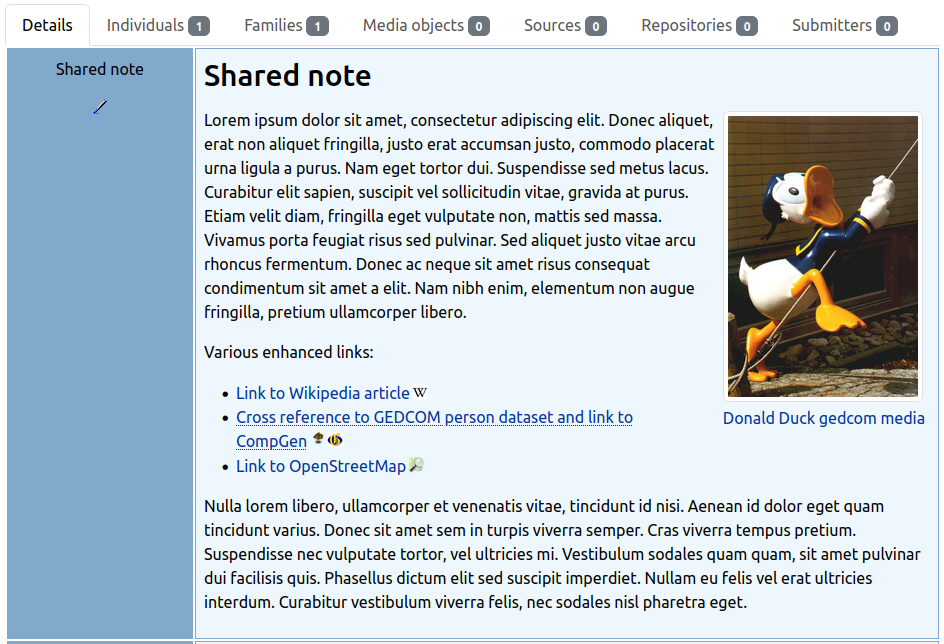
note with enhanced links and image from media record
The main purpose is to make links to data records stored in family trees more convenient. This avoids having to store fully qualified links, which impairs the portability of GEDCOM data. By linking notes to GEDCOM data records (persons, families, sources, etc.) from the text, storytelling becomes much easier.
Support
Issues: for any ideas you have, or when finding a bug you can raise an issue.
Forum: general webtrees support can be found at the webtrees forum.
2.1 - Setup
Installation and requirements
What do we need to install this module and how to set it up correctly.
2.1.1 - Requirements
System requirements for the LinkEnhancer module
This module requires webtrees version 2.2 or 2.3.
This module has the same requirements as webtrees#system-requirements.
It was initially created for version 2.2.4; since linkenhancer 1.6.1 it should also work with webtrees 2.3. Tests were usually run with built-in themes and some other custom modules.
Tip: It’s recommended installing the Cronjob module as well. This makes it easy to run the CLI scripts for maintaining the indexes.
2.1.2 - Installation
Step-by-step installation instructions
Via Custom Module Manager (recommended)
Install and use Custom Module Manager for an easy and convenient installation of webtrees custom modules.
Open the Custom Module Manager view in webtrees, select “linkenhancer”, and click on the “Install Module” button.
If everything was successful, you should see a subdirectory linkenhancer with the unpacked content in the modules_v4 directory.
Note: During the initial installation, the following problem may occur: “PDO error - There is no active transaction” — for more details see known issues.
When the first four basic features are enabled, more detailed settings can be configured further down. There are also two global settings for debug output in the browser’s JavaScript console and the web server error log file, and you can choose whether links should always open in a new browser tab (it’s also possible to set different options for each core feature).
Below are the available options on the admin page:
[1] Enhanced Link Support
Custom external targets
Here are two example entries from predefined targets to illustrate the principle who to provide additional external targets with an own custom JavaScript object.
{
"fsft": {
name:'Family Search Tree - $ID',
url:'https://www.familysearch.org/tree/person/details/',
cname:'icon-fsft' },
"wp": {
name:'Wikipedia',
url: (id, title) => {
let parts = id.split('/');
if (parts.length <2) {
title = title +" - "+ options.i18n('syntax error') +"!";
return { url:'', title };
}
let subdomain = parts[0];
let article = parts.slice(1).join('/');
title =`${title} - `+decodeURIComponent(article) +` (${subdomain})`;
return { url:`https://${subdomain}.wikipedia.org/wiki/${article}`, title };
},
cname:'icon-wp',
help: [
{ n: options.i18n('wp-help1'), e:'de/Webtrees' },
{ n: options.i18n('wp-help2'), e:'en/Webtrees' },
{ n: options.i18n('wp-help3'), e:'other-subdomain/Webtrees' },
]
}
}
Property explanation (the syntax of a base enhanced link: #@param-key=param-value):
key — the short name or query parameter key (param-key)
name — title or label to be displayed as link title; the placeholder $ID is replaced by the given id (param-value)
url — service URL to be called; the parameter value / given record id (param-value) is appended to the end of the URL. It can also be a function that accepts (id, title) and returns an object { url, title }.
cname — CSS class name(s) whitespace separated
help — optional array of objects [{n:'', e:''},..] to illustrate the use of a non-standard target by examples (in e), provided with explanatory text (in n). Listed in the markdown help.
options.i18n is a function passed through from this module in order to provide translated strings.
Any CSS rules required are best added via the CSS and JS module. Only the definition of the icon (size 30 x 30 pixels is sufficient) as a background image is actually needed — referencing as data: URLs. For example: .icon-whatever { background-image: url(...) }
[2] Markdown enhancements
If you as a developer also want to apply the markdown editor (mde) to text areas on the edit pages of other custom modules, you can do so using the MarkdownEditorActivationService (available since v1.2.11 — details see #101):
<?php
privatefunctiontoggleTinyMde(bool $enable, bool $force=false): void
{
$class="Schwendinger\\Webtrees\\Module\\LinkEnhancer\\Services\\MarkdownEditorActivationService";
if (Registry::container()->has($class)) {
/** @var MarkdownEditorActivationService $mde_service */$mde_service= Registry::container()->get($class);
$existingRule=$mde_service->getCustomRule(self::CUSTOM_TITLE);
if (
$force||$enable&&!$existingRule||!$enable&&$existingRule ) {
$mde_service->setCustomRule(
self::CUSTOM_TITLE, // module name as key
$enable? ["source-transcription-detail"] : [], // handler: route name
$enable? ["textarea[id$='_text']"] : [] // filter: querySelector
);
}
}
}
This only works if this feature has been enabled globally and the edit page is associated with a tree that also uses Markdown in its notes.
You can view the registered users in the hidden text field below the radio buttons for enabling or disabling the option “Markdown editor for note textareas ” by hovering your mouse cursor over the area.
Known custom modules that make use of this feature:
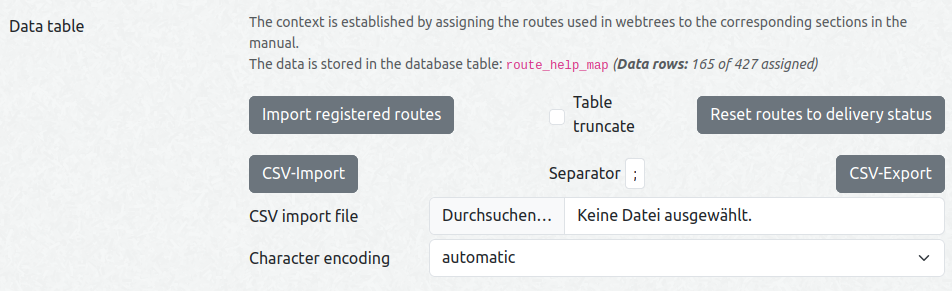
It is possible to import routes registered in webtrees on demand. This makes it easier to cover individual custom module configurations.
Furthermore you can import and export data in CSV format in order to make changes more convenient. You can define the separator and for import the character encoding (on export it is always UTF-8). You can see at a glance how many data rows are stored in the table and how many of them have a URL assigned.
In case of discrepancies the context help can be more easily adjusted by activating the option “Output of debug information on the JS console”. This provides you with information on the active route and, if applicable, data table entries found for matching routing to help topics.
Route-to-help mapping
The mapping of routes to help articles in the manual is stored in the database tablele_route_help_map. This module comes with predefined mapping rules. If there is something missing or you find an issue, don’t hesitate to share it.
Technical background information follows. The table has the following headers (the headers required in a CSV file for import are marked with !!):
id: automatic key — not relevant, the data field is only used to make it easier to identify the data record during editing.
path!!: route path — corresponds to the path of webtrees pretty URLs
handler!!: usually corresponds to the PHP class name of the code that handles the request
method!!: web request method (GET, POST, HEAD). Only GET routes are generally relevant for assignment to manual sections.
extras!!: PHP class name of access level (Fisharebest\Webtrees\Http\Middleware\Auth*)
subcontext!!: CSS selector string or JSON object string to address a component/subcontext topic on the given page
category: string value for better grouping data rows; only value ‘generic’ has a special meaning
order!!: arbitrary numerical sort key, matching data rows are sorted in ascending order (standard value is 10)
url!!: path of the URL to the webtrees manual (concatenated with the given GenWiki base/domain URL). Also fully qualified URLs to other web resources are possible and supported.
updated_at: timestamp of last update — helps to identify possibly outdated data rows
As we can see in app/Http/Routes/WebRoutes.php, where standard webtrees routes are defined, for a route the following information is mandatory:
path
handler
method
Optionally extras can be provided. If none of those four mentioned fields is set, the data row is filtered by the seeder. On import category and order are set automatically if not set.
In order to get a first class match with the current route, those four fields have to match.
Normally, it is only necessary to assign GET routes to an article. We also have a few redirect routes and ajax helper routes (which provide data for form controls) that can be ignored.
Special cases are the paths beginning with /module/{module}/{action} or /tree/{tree}/data-fix/{data_fix}: they are handled by an integrated proxy class that addresses the custom module by a route attribute:
For mapping such a route to a specific custom module help article the handler is set to the above mentioned route attribute value (e.g. _vesta_classic_look_and_feel_). For a more generic rule, path can also be empty (then one rule can be used for both cases).
Fallback rules for access levels are matched by category='generic' and the specific Auth classname in extras.
In ascending order the first rule where subcontext = '' is selected for the top menu link. If nothing else applies, the link points to the start page of the manual.
If activated, subcontext topics on a page can be provided with an additional help link. You can set a CSS selector string or a JSON object string with the following properties:
p: position of popover, optional (default is top, other possible values: left, right, bottom)
f: css selector/filter string (only necessary if you want the popover to be positioned differently) OR
e: javascript expression string
This is useful if there are components on the page that require more detailed information than offered by the help link in the top menu (e.g. for custom module functions on the individuals page). This help link is displayed in a popover (because an additional link does not always work in bootstrap tabs, accordion headers or menu titles).
Set category='generic' for rules that should apply to more than one page.
Table of contents (TOC)
This module downloads a multilingual table of contents for the German webtrees manual from a remote feed (JSON files: structure, language translations, and a version manifest). The data is cached locally and refreshed automatically:
On-the-fly: when a user views the TOC page and the cache has expired (24 h), the service checks the feed manifest (version.json) for per-file hash changes and re-downloads only the files that changed.
Proactive (cron): the refresh-wthb-toc cron job (daily at 03:00 by default) downloads all files regardless of cache state.
Auto-update toggle: the module admin page offers an “Auto-update” switch for the TOC data. When disabled, only locally cached data is served (no HTTP downloads). The admin Force refresh button and the CLI with --force still work regardless of the switch. Tip: refresh the data before disabling to ensure the latest version is cached.
CLI:
php modules_v4/linkenhancer/cli/refresh-wthb-toc.php              # scope from module pref
php modules_v4/linkenhancer/cli/refresh-wthb-toc.php --all        # all available languages
php modules_v4/linkenhancer/cli/refresh-wthb-toc.php --lang=en,fr # specific languages
php modules_v4/linkenhancer/cli/refresh-wthb-toc.php --clear      # only clear cache
php modules_v4/linkenhancer/cli/refresh-wthb-toc.php --force      # run even if auto-update is disabled
While auto-update is switched off, scheduled refreshes are skipped (the cron run exits 0 without doing work). --force refreshes anyway (e.g. to prepare for re-enabling), and --clear works regardless of the switch.
External help links
The module contains some standard external help links, that are defined in JSON — array of objects with the following members:
title: display text for the link, can also contain HTML (string, mandatory), language should be en-US; for standard link titles translations are provided
url: link to web resource (string, mandatory)
class: additional CSS class names (string, optional)
self: if set, link target is _self (opens in place), otherwise _blank (any type, optional)
i18n: overwrite title with user defined translation for given language tags (object, optional; keys are language tags, values are translated titles)
Explanation: The object key name is set to the theme name to be matched, and the string value contains one or more CSS style rules. In this example we have a fallback rule with key * that matches all themes unless there is a specific key.
Theme colors is a special case, where we also have palettes. In order to address this combination the key is set to theme name_palette name. The key colors matches all subthemes.
Just activate the option “Output of debug information on the JS console” in order to figure out the correct values.
2.2 - Features
Overview of all LinkEnhancer features
2.2.1 - Enhanced Links
Cross-references and linkenhancer links in GEDCOM records
Although webtrees replaces XREFs such as @I2@ in notes with a cross-reference and its appropriate display name, this is not very flexible. You can’t determine the display name, which means that in the event of an error (due to XREF renumbering or typing error), it is not easy or possible to resolve the cross-reference to the corresponding data record without any doubt.
Tip: The custom module webtrees-mitalteli-show-xref can help you find the XREF and UID reference of personal data records. Some UIDs (38 characters length) are automatically shortened by webtrees in the standard view — this module shows the unchanged UIDs.
How it works
The enhanced links function is implemented via JavaScript and searches in the rendered output of webtrees for <a> tags whose href attribute values begin with #@. This way it is possible to handle links in markdown and HTML markup. Because it is processed in the browser on the client side, the existence of the cross-referenced data records in webtrees is not checked in advance. Errors only occur when the link is clicked (e.g. if the access to the resource is restricted).
As a bonus, different destinations can be addressed with one link definition, whereby the cross-reference is always the first link (if set) and the others are represented by attached clickable icons only.
Each parameter key can be specified multiple times — but you shouldn’t overdo it for the sake of clarity.
Additional external destinations can be configured on the Admin page.
Syntax
Markdown: An enhanced link looks like this [Link display title](#@param1¶mN), so that one or more targets can be addressed at once. For cross-references in webtrees a record reference (REF can be the XREF or a UID) is expected:
wt=@REF@ or wt=@REF@othertree — standard link, access to record page via redirect URL
wt=n@REF@ — legacy link with given record type (here: to a note with REF in the current tree)
Available record types: i=individual, f=family, s=source, r=repository, n=note, l=sharedPlace
wt=i@REF@othertree+dia — link to record type individual with REF from tree “othertree” and also link to Interactive tree of this person
HTML: The same applies to HTML links: <a href="#@wt=i@I1@">Link display title</a>
This is also usable in cooperation with the name badge function of the Vesta Classic Look & Feel module in the HTML snippet field: <a href="#@fsft=<ref/>"></a> for linking to a record in the Family Search Family Tree. It’s also possible to embed those links in news articles of Tywed’s news-menu module or in FAQ articles.
The syntax of the external targets is listed by the markdown help function of this module. In most cases, only one key-value parameter pair needs to be specified, consisting of the short name of the desired target and the ID of the data record located there.
Example
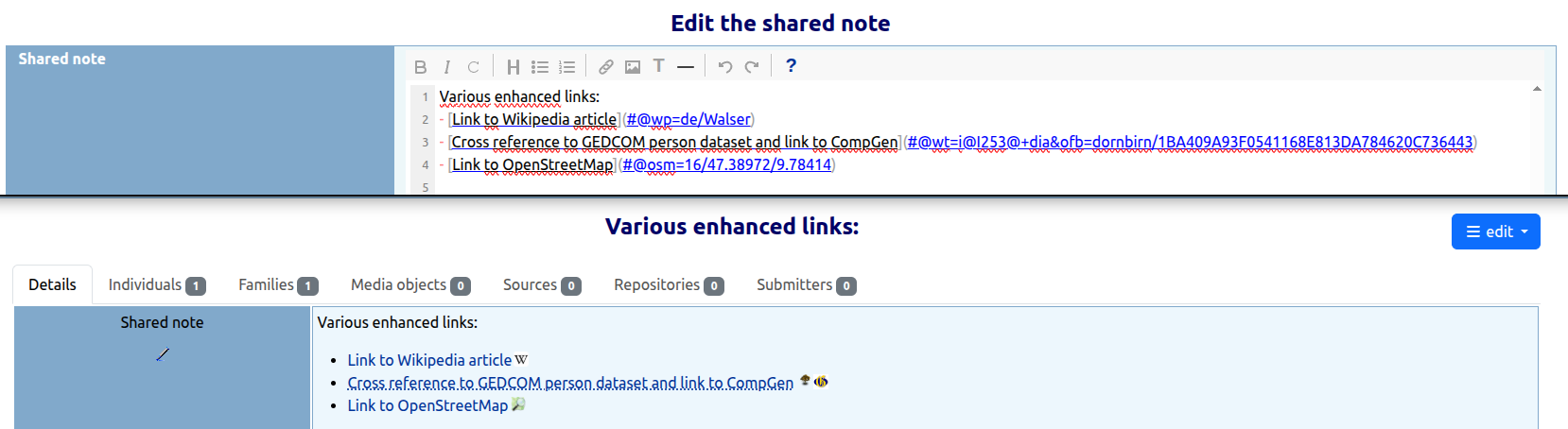
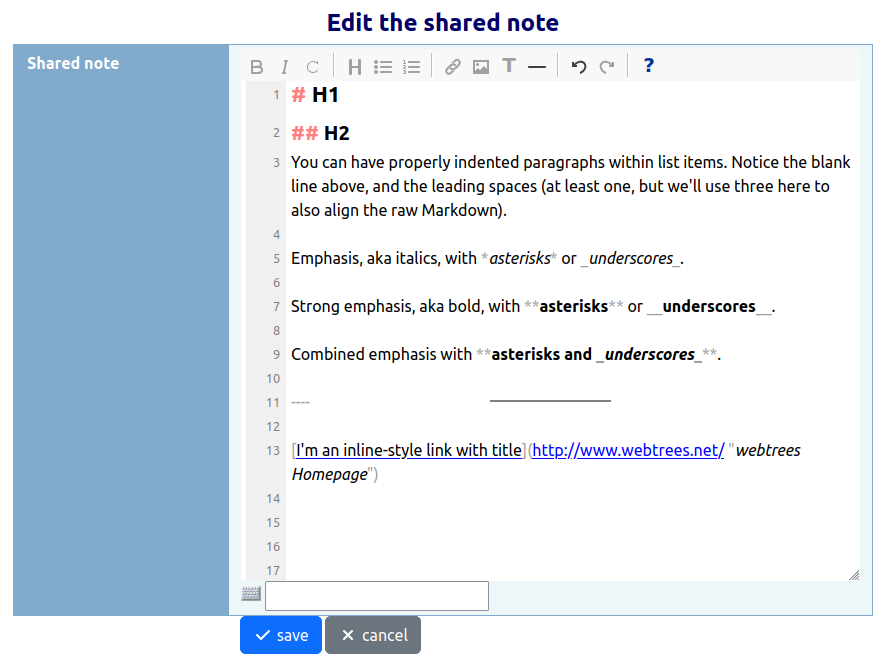
In the upper part of the image we can see the edit mode of a note record, below how it is rendered in view mode:
2.2.1.1 - Cross-Reference Overview
Cross-reference overview with link index for large trees
There are three types of overviews:
overview about all data for the admin (admin overview),
to one tree limited overview (user overview), and
record-specific overview on the record details view (record overview, as tab or modal).
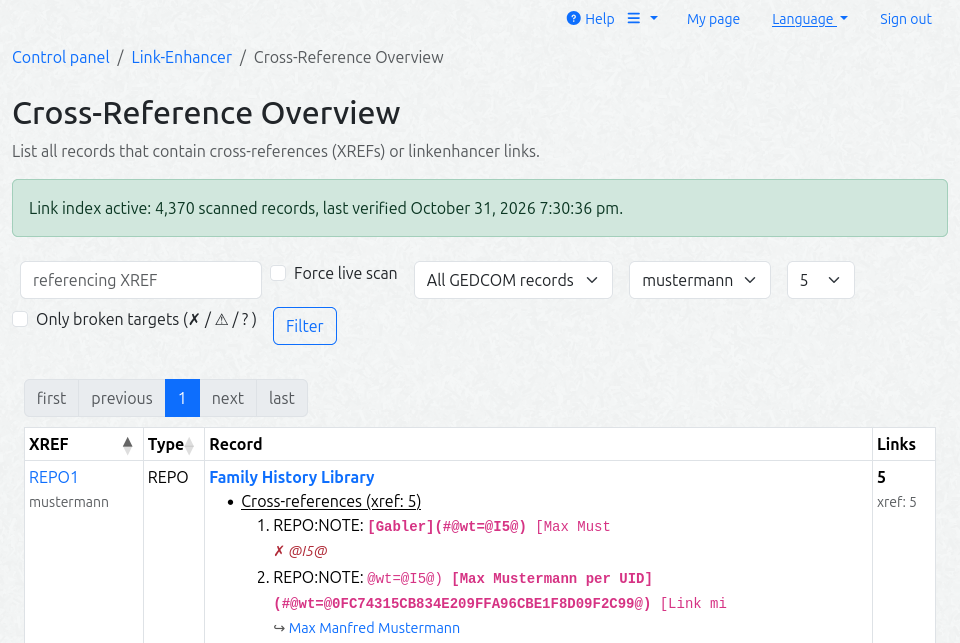
The admin overview (Control panel → LinkEnhancer → Cross-reference overview) is a server-side paginated DataTable. It lists all records that contain classic @XREF@ cross-references or linkenhancer links, with a per-record link inventory.
Optional filters:
referenced XREF (only available while a fresh link index is active — in live-scan mode the field is hidden, because it would only be a coarse pre-filter there — no classic references are found),
record type,
tree, and
the number of tokens shown per link class (all / 5 / 10 / 20, default 5).
The XREF cell shows the tree name as a second muted line; the type is its own sortable column. Each inventory token is displayed as a short display context (snippet) with the link token itself in bold.
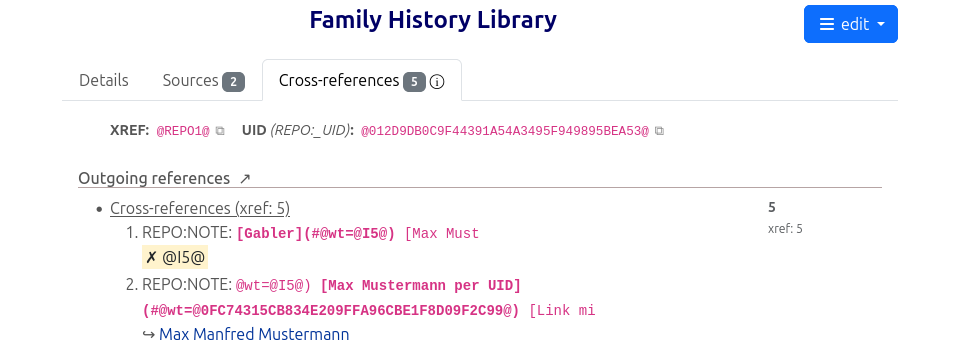
Optionally you can enable a user overview per tree and a record overview with incoming and outgoing references per GEDCOM record. The record overview also displays the XREF and, if applicable, the UIDs of the record, so that these references can be more easily copied into notes.
Supported engines
Live overview
Link index (CLI)
MariaDB / MySQL
yes (REGEXP gate)
yes
PostgreSQL
yes (REGEXP gate)
yes
SQLite / SQL Server
limited mode — automatic fallback to a coarse LIKE gate + full table scan per request (banner on the page); the exact classification still happens in PHP
not available (needs REGEXP + MD5) — the CLI exits with an error
How it works
On large trees the live regex scan over the GEDCOM tables can be slow, so the page can instead read a link index made of three module tables (the Developer / Project Structure section contains more details about the database schema):
le_record_scan — one row per scanned record with an MD5 fingerprint of the record text
le_link_index — one row per (link, target) found in the record (the display context captured at build time) — the foundation for displaying incoming cross-references in the record overview
le_index_meta — single row — the state of the last complete index run
flowchart TD
    CLI["🛠 cli/build-link-index.php<br/>Cron: */30 * * * *"]

    subgraph Scan["🔍 Incremental scan"]
        FP["MD5 Fingerprint<br/>per record"]
        DIFF{"🔀 Changed?<br/>(new / removed)"}
    end

    subgraph Tables["💾 Tables"]
        RS[("le_record_scan<br/>file, xref, hash")]
        LI[("le_link_index<br/>token, target, snippet")]
        META[("le_index_meta<br/>last_run, rows")]
    end

    PAGE["📄 XREF Overview Page"]

    CLI --> Scan
    FP --> DIFF
    DIFF -->|✅ yes| SCAN["PHP Scan<br/>(XrefsService)"]
    DIFF -->|⏭ no| SKIP["skip"]
    SCAN --> RS
    SCAN --> LI
    CLI --> META

    META -->|"🟢 fresh (< 2 h)"| PAGE
    META -->|"🟠 stale"| LIVE["Live Regex Scan"]
    LIVE --> PAGE

    classDef scanStyle fill:#e3f2fd,stroke:#1565C0,stroke-width:2px
    classDef tablesStyle fill:#e8f5e9,stroke:#2E7D32,stroke-width:2px
    classDef decideStyle fill:#fff3e0,stroke:#E65100,stroke-width:2px
    classDef pageStyle fill:#fce4ec,stroke:#C2185B,stroke-width:2px

    class FP scanStyle
    class RS,LI,META tablesStyle
    class DIFF decideStyle
    class PAGE pageStyle
Initial build (first run, or --rebuild): both index tables are reset, all scan rows are created server-side in one bulk statement per GEDCOM table (fast, zero row transfer), and only the records that pass the link pre-filter are scanned in PHP. The initial build is a one-time cost — use a higher --limit for it. If it is interrupted by --limit, the next run converges (the build is idempotent).
Incremental runs (the normal cron case): only records whose MD5 fingerprint changed — or which were added/removed — are re-scanned (cursor chunked), so the job stays cheap even on large sites.
Cron example (every 30 minutes, up to 2000 records per run):
Only a full run (without --tree) that is not cut by --limit marks the index fresh (le_index_meta.last_run). A run cut by --limit continues where it stopped; a --tree run only refreshes that tree.
Flushing
--flush empties the index tables and exits (no rebuild) — for testing (force the page onto the live scan) and maintenance (clean restart, broken index):
php modules_v4/linkenhancer/cli/build-link-index.php --flush            # all trees
php modules_v4/linkenhancer/cli/build-link-index.php --flush --tree=5   # only tree 5
The freshness flag is always reset, so the page reliably falls back to the live scan afterwards. The next full run is an initial build again (full re-scan cost). --flush combined with --rebuild is redundant — --rebuild already resets and rebuilds.
What counts as a link
The overview and the index use one shared pre-filter (single source: XrefsService::linkPrefilterPatterns()):
NOTE (level >= 1) with an @XREF@or a ](#@ link, with content on the same line. A NOTE value that is exactly one reference (1 NOTE @N5@) is a GEDCOM shared-note pointer — a structural reference, not a text link, and is not listed.
CONC/CONT/TEXT/_TODO with an @XREF@ (naked is a link) or a ](#@ link
an LE link may carry an optional id=@XREF@ parameter (at most one, the position among the parameters does not matter) — like the wt= parameters it is indexed as a link target
a shared note’s own level-0 text (0 @N1@ NOTE …)
matching is line-based (no cross-line matches), on the same lines the collector reads
The page shows which source it uses:
index active (green note): a full, complete index run finished less than 2 hours ago (default; XrefsService::INDEX_FRESH_SECONDS)
live scan (blue note): no fresh index — the page falls back to the live scan
limited mode (yellow note, SQLite/SQL Server): see the engine table above
Use p1-measure.php
(read-only) on your instance to check how expensive the live scan is for your data and to calibrate the cron schedule.
2.2.1.2 - Renumber XREFs (with links)
Renumber XREFs with automatic link repair
The standard webtrees renumbering (Control panel
Manage family trees → [Family tree] → Renumber XREFs) resolves cross-tree XREF collisions but does not update linkenhancer or classic links. This module provides an extended renumber that repairs all affected links in one step.
Access: Control panel → LinkEnhancer → Renumber XREFs (with links)
Workflow:
Select the tree that has XREF collisions (duplicate XREFs with other trees).
The page shows each conflicting XREF, its record type, and the number of inbound linkenhancer references from the link index.
On submit, each conflicting XREF is:
renamed in the GEDCOM core tables (same as the standard renumber)
all wt=@XREF@ / id=@XREF@ links in notes and blocks are updated
the link index (le_link_index) and UID index (le_uid_index) are repaired inline or deferred to cron
Each renumbered record is logged in the edit log (Admin → Changes log), e.g. Renumbered @I456@ → @I457@ (INDI, 3 core rows, 2 links).
If the PHP time limit is reached, the run stops with partial progress — the remaining conflicts are renumbered on the next run.
Note: The standard webtrees renumber (without links) remains available and is unaffected. Use this module’s renumber when your notes or blocks contain linkenhancer links.
See also: fisharebest/webtrees#5156
2.2.1.3 - Data Fixes
Data-fix handlers for link integrity issues
The module provides a set of data-fix handlers accessible from the webtrees data-fix interface (Control panel → Data fixes → LinkEnhancer). Each handler addresses a specific link integrity issue:
Fix
What it does
XREF ⇄ UID reference swap
Converts linkenhancer link targets between XREF and UID form. Direction is selectable (XREF→UID or UID→XREF). Requires the UID index to be built.
Fix wt= type letter
Sets, repairs, or removes the legacy type letter in wt=<type>@REF@ links. Modes: set (add missing type), repair (fix wrong type), remove (strip type letter).
Report dangling link targets
Report-only: lists linkenhancer links whose target record no longer exists. No changes are made.
Report ambiguous UID targets
Report-only: lists links whose UID target resolves to more than one record. No changes are made.
Report duplicate UIDs in index
Report-only: lists UIDs assigned to multiple records in the UID index. No changes are made.
Each fix follows the webtrees data-fix workflow: select fix type → preview → apply. The data-fix page also shows the current status of the link and UID indexes, and whether index updates will be deferred to the cron job.
2.2.2 - Markdown
Markdown rendering in note records
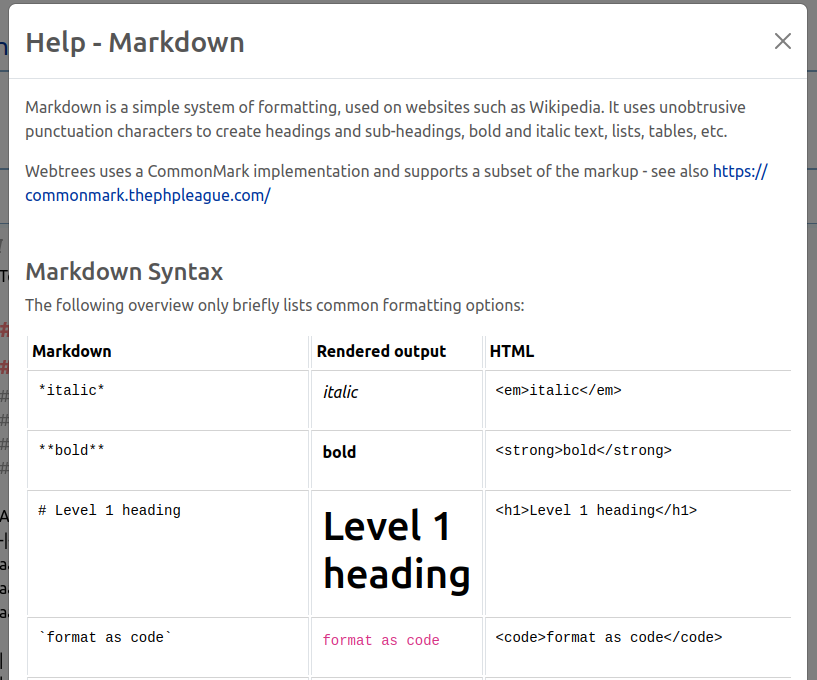
Markdown is a simple system of formatting, used on websites such as Wikipedia or GitHub. It uses unobtrusive punctuation characters to create headings and sub-headings, bold and italic text, lists, tables, etc.
Webtrees uses a CommonMark implementation and supports a subset of the markup. It is optionally supported in note records on a per-tree basis.
Note: For the Markdown Image Support and the additional Markdown Extensions the MarkdownFactory class needs to be extended by this module. This replacement class also fixes fisharebest/webtrees#4841, so that a pre-formatted markdown block is not rendered as a single line anymore.
2.2.2.1 - Markdown Image Support
Embed images from GEDCOM media records or public folder in notes
This feature allows you to easily embed images from GEDCOM media records (which reside behind the media firewall) or from the public directory into notes. If restriction rules apply to the record, instead of the image, a message is displayed.
Syntax:


Technically the images are packed into a div container together with an image subtitle — which is also a link to the media data set for GEDCOM objects. The display can be customized as required using the standard CSS classes or per-image additional CSS classes (e.g. float-start or float-end from webtrees vendor.css).
2.2.2.2 - Markdown Editor
Visual markdown editor (TinyMDE) for note textareas
Besides syntax highlighting it ships with an icon bar for common format commands, a help popup and line numbering.
Note: Unfortunately, the on-screen keyboard does NOT work as before with the previous text input field. The selected characters end up as an intermediate step in the small text field below the Markdown editor and then must be copied manually to the desired position.
Warning: Please keep in mind when using these extensions, you are deviating from the smallest common markdown dialect set. If the library used to render markdown in HTML needs to be changed for any reason, there is a possibility that not all of the extended markup used here will be supported (see also #32). Since the markup is not intrusive, the impact should not be serious — of course, it’s a minor drawback.
The package League\CommonMarkdown used for processing Markdown texts offers several useful extensions that can be activated optionally:
You can activate all or a few selected of these extensions. As far as possible they are of course integrated with the markdown editor and you find additional information in the markdown help.
Footnotes
Footnotes can be placed near their references (there can be one or many references to one footnote) or everywhere you want. For the overview, it is advisable to place them at the bottom. When rendering, the footnote container resides at the end of the content.
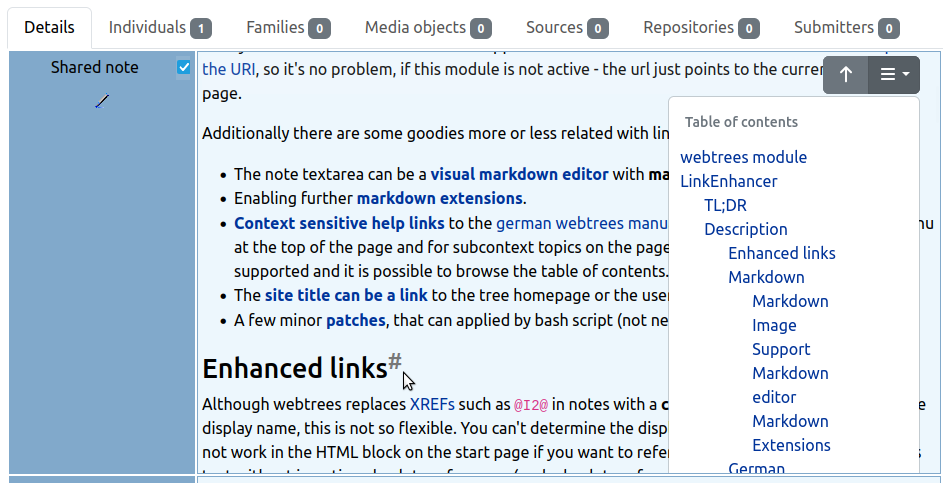
Table of Contents
If your text is structured with headings, it is a good choice to activate the table of contents extension. The table of contents is generated automatically and included into the content above the very first heading or instead of a placeholder.
2.2.2.4 - Table cell height control
For longer markdown note texts it’s sometimes a pain to scroll through if you are interested in the next facts beneath them at the moment. This feature should come in handy here: By activating the checkbox in the top right corner of the title cell (first table column), the maximum height of the content cell with the long note is set to about 80% of the viewport height. This makes the content itself scrollable.
Where applicable, the function can be activated by default (or simply made available) and can also be deactivated independently.
In combination with the table of contents extension (position = dropdown), you can navigate through the text easily — assuming the text is structured with headings.
You can decide if the checkbox is always visible or hidden until you hover the fact title cell with the mouse cursor. If the text length of the content cell doesn’t exceed the defined maximum height, the checkbox can not be activated.
2.2.3 - German webtrees manual (WTHB)
Context-sensitive help links to the German webtrees manual
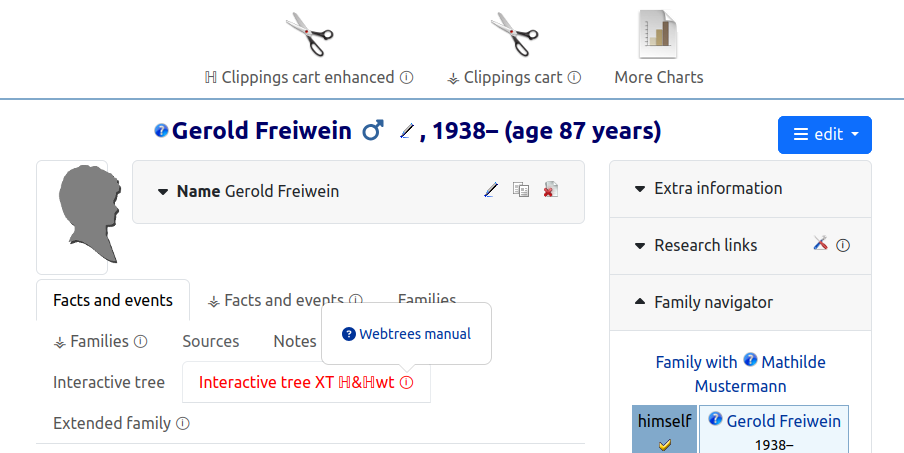
A context sensitive help link to the German webtrees manual can be added to the small navigation menu. Context links are also available for components on pages provided by custom extensions (e.g. on the individuals page, the start page or items in the main menu) — these can be identified by the i symbols in a circle.
To ensure that this function is also available in the admin backend, a modified version of views/layouts/administration.phtml must be registered. This module attempts to use the custom module vesta_common (if installed and enabled) or its own version of the view layout file. Alternatively, patch P002 could also be applied to the core code.
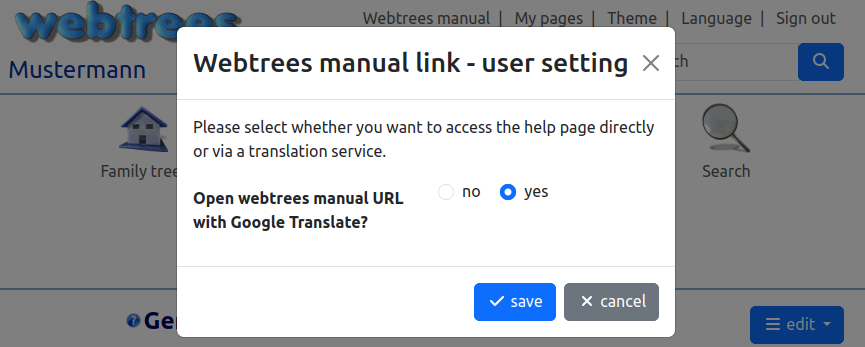
If the webtrees page is displayed in a language other than German, it is possible to open the webtrees manual URL via a translation service (Google Translate). This can be enabled or disabled as a site setting or delegated to the visitor to decide.
Note: Due to AI bot restrictions on the GenWiki, this feature is currently useless.
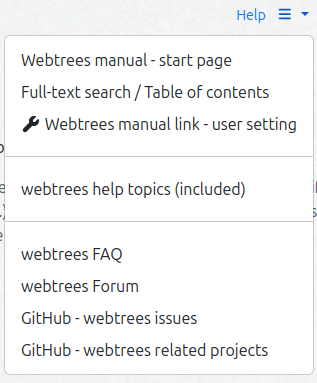
The settings dialogue can be accessed via the help submenu in the top menu. When this option is enabled, you will also find a link to a dialogue box that displays a full-text search in the German webtrees manual (using various search engines) and the table of contents. How the TOC itself is produced (GenWiki round trip, generation, Weblate) is documented on the WTHB TOC Language Pipeline page.
Submenu
In addition, the submenu contains an overview of the help topics included in webtrees and customisable external help links (e.g. webtrees FAQ and forum, GitHub repo, etc.). The top menu item can be split into two links — one to directly open the context help article and the other to open the submenu.
2.2.4 - Home Link
Site title as a configurable link with theme-aware CSS
The site title can be a link to the tree homepage or the user my page. The webmaster can also set a user-defined URL.
Dynamic CSS styles can be applied to match the current theme, ensuring that the display contrasts well. Of course it is not limited to the home link use case - for details see Admin settings.
2.2.5 - UID Lookup
Navigate to a record by its persistent UID
A UID (_UID in GEDCOM 5.5.1, UID in GEDCOM 7.0) is a persistent identifier assigned to a record. The UID survives XREF renumbering and tree migrations, making it a stable reference point.
This feature allows navigating directly to a record by its UID. The URL pattern is:
/tree/{tree}/goto-uid/{uid} — scoped to one tree
/goto-uid/{uid} — global (searches all trees)
Behavior:
0 hits → 404
1 visible hit → redirect to the record
>1 visible hit → selection list (case-variant UIDs or the same UID in multiple records)
UID comparison is case-insensitive (GEDCOM specs do not define UID as case-sensitive). The stored value is verbatim; matching is done case-insensitively so that case-variant UIDs return a selection list rather than a possibly-wrong single redirect.
You can look up UIDs via the quick search input. For shorter UIDs that can be regarded as XREFs, the prefix uid: can be added to the search value.
Standard navigation (goto-id)
goto-id is the standard navigation target for every linkenhancer link — both untyped (wt=@REF@) and typed (wt=<type>@REF@) — and resolves a reference that is either a record XREF or a UID. The URL pattern is:
/tree/{tree}/goto-id/{id} — scoped to one tree (falls back to a global lookup when nothing is found in the tree, with a flash notice)
/goto-id/{id} — global (searches all trees)
Behavior (shared IdResolver): the id is tried length-aware and bidirectionally — a long id (≥ 18 chars) as a UID first, a short one as an XREF first — and falls back to the other when the first yields nothing, so a resolution is never lost. 0 hits → 404, 1 visible hit → redirect, >1 → selection list.
sequenceDiagram
    autonumber
    participant U as 👤 User (Browser)
    participant JS as LE JavaScript
    participant WT as webtrees Server
    participant IR as IdResolver
    participant DB as Database

    Note over U,JS: Click on an LE link
    U->>JS: Click on #@wt=@I234@
    JS->>JS: detect href "#@…"
    JS->>WT: GET /tree/5/goto-id/I234
    WT->>IR: resolve("I234", tree=5)

    alt ID short (< 18 chars) → try as XREF first
        IR->>DB: SELECT … WHERE xref = 'I234'
        DB-->>IR: Match?
    else ID long (>= 18 chars) → try as UID first
        IR->>DB: SELECT … FROM le_uid_index WHERE uid = '…'
        DB-->>IR: Match?
    end

    alt ✅ 1 match
        IR-->>WT: Record
        WT-->>U: Redirect to record page
    else 0 matches → Fallback
        IR->>IR: try the other direction (XREF ⇄ UID)
    else >1 matches
        WT-->>U: selection list
    end

    Note over IR,DB: Bidirectional — XREF ⇄ UID<br/>a lookup is never lost
A typed wt=<type>@REF@ link is a legacy form: the type letter is no longer used for routing (all links go through goto-id) and is only documentary — it still drives the diagram link for individuals and the type-mismatch hint in the cross-reference overview. New links should use the untyped wt=@REF@ form.
XREF route (goto-xref)
There is also the route /tree/{tree}/goto-xref/{xref} available, which allows you to navigate to the corresponding record in the tree, regardless of the record type.
Cross-reference overview: UID targets in other trees
In the admin Cross-Reference Overview a link whose UID target is not found in the record’s own tree is normally shown as “target not found”. When the UID feature is enabled, such a target is additionally resolved globally (across the other trees); if matches exist it is rendered as not unique (?) with the match count instead: up to 3 matches are listed as direct cross-tree links, more than 3 collapse into a single goto-id link (title = the UID). This behavior is hard-gated on the UID feature preference and never applies to targets that name an explicit tree.
Index
The UID index is stored in the le_uid_index table (one row per UID tag occurrence, distinguished by tag_path). It is maintained exclusively by build-uid-index.php
(no live scan on request).
Initial build (first run, or --rebuild): full scan of all GEDCOM tables, extracting all UID tags via UidTagCollector.
Incremental runs: only records whose MD5 fingerprint changed (or were added/removed) are re-scanned.
Cron example (every 10 minutes, up to 5000 records per run):
The feature can be toggled on/off in the module admin page (“Activate Support” → [5] UID lookup). The current index status (row count, last build time) is shown there.
While the feature is switched off, index builds are skipped automatically (the cron run exits 0 without doing work). --force builds the index anyway (e.g. to prepare for re-enabling), and --flush works regardless of the switch.
Note: UID tags at any nesting level are indexed (e.g. 0 @I1@ INDI, 1 _UID, 1 FAMF, 2 _UID). The tag path is stored per row so duplicates are distinguishable in the selection list.
2.2.6 - Patches
Optional webtrees core patches
The patches can be applied additionally — the module also works without them!
The util subfolder contains minor patches for the webtrees core. These are diff-files that can be easily applied or removed using shell from within the installed module folder (necessary for auto-detecting webtrees sources):
Usage: util/wt-patch.sh [-R][FILTER] -R undo Patch (patch -R) FILTER '*'for all or specific (e.g. '01')
Don’t forget to reapply the patches after updating webtrees.
These are minor bug fixes or functional enhancements — usually in a single file — that are intended to bridge the gap until they are officially fixed/implemented in the webtrees core.
#
Description
Applies to version
P001
Backlink for level 1 shared notes #5181 — not necessary anymore except you would like to have an additional edit link. app/Fact.php
2.2.1 - 2.2.6
P002
Enable headContent/bodyContent for this module on admin backend in order to show the context help link #5214. resources/views/layouts/administration.phtml
2.2.1 - 2.2.6
P003
Record has multiple uid fields #4828. app/Services/GedcomEditService.php
2.2.1
2.3 - Developer
Development documentation
2.3.1 - CLI Scripts
Command-line maintenance scripts
The module ships CLI-only scripts. They are guarded: requested over HTTP (the modules_v4 directory is inside the web root) they answer 403 instead of running.
If you’d like to contribute to this module, great! You can contribute by:
Contributing code — check out the issues for things that need attention. If you have changes you want to make not listed in an issue, please create one, then you can link your pull request.
Testing — it’s all manual currently, please create an issue for any bugs you find.
Translation
You can contribute to this project on Codeberg Weblate. Updated translations will be included in the next release of this module.
Beside English the following languages are available:
The module owns five tables (prefix le_), created incrementally by src/Schema/Migration#.php. Every migration is additive and idempotent, so the schema converges on each module load.
le_route_help_map
Maps a webtrees route (path / handler / method) to a help entry — the backing store for context-sensitive manual help. Seeded by SeedHelpTable.
Column
Type
Notes
id
int, PK (auto)
path
varchar(255)
route path
handler
varchar(150)
fully-qualified handler class
handler_key
varchar(150), index
version-neutral key (2.2.6 + 2.3 compatible)
method
varchar(20)
extras
varchar(60)
subcontext
varchar(250)
category
varchar(60)
standard / custom module / generic …
order
int, default 10
url
varchar(250)
updated_at
timestamp, nullable
Index on (path, handler) and on handler_key.
le_record_scan
One row per scanned GEDCOM record, with an MD5 fingerprint of the record text — lets the CLI index diff incrementally.
Column
Type
Notes
file
int
tree id (part of PK)
xref
varchar(20)
(part of PK)
rectype
varchar(15)
GEDCOM tag, e.g. INDI, OBJE (part of PK)
hash
varchar(32)
MD5 of the record text
scanned_at
timestamp, nullable
Primary key (file, xref, rectype).
le_link_index
One row per (link, target) found in a record — the foundation for the planned Backlink feature.
Column
Type
Notes
id
int, PK (auto)
file
int
tree id
xref
varchar(20)
rectype
varchar(15)
tag_path
varchar(255)
where the link sits in the record
link_class
varchar(10)
xref / ext / pic / classic / other
token
text
the raw link token
snippet
text, nullable
display context captured at build time
target_xref
varchar(20), nullable
XREF link target
target_tree
varchar(255), nullable
target_uid
varchar(255), nullable, index
UID link target (filled by a length heuristic)
Indexes on (file, xref, rectype), target_xref and target_uid.
le_uid_index
One row per UID tag found in a record (record-level and fact-level). No unique constraint — UIDs are not guaranteed to be unique.
Column
Type
Notes
id
int, PK (auto)
file
int
tree id
xref
varchar(20)
uid
varchar(255), index
verbatim UID value (no normalization)
rectype
varchar(15)
tag_path
varchar(255)
hash
varchar(32)
MD5 fingerprint (incremental change detection)
Indexes on uid and (file, xref, rectype).
le_index_meta
A single row (id = 1) holding the freshness state of both the link index and the UID index.
Column
Type
Notes
id
int, PK, default 1
single row
last_run
timestamp, nullable
last complete link-index run
rows
int, default 0
link-index row count
uid_last_run
timestamp, nullable
last complete UID-index run
uid_rows
int, default 0
UID-index row count
2.3.4 - Class Hierarchy
Auto-generated class overview
Auto-generated by docs/tools/generate-class-hierarchy.php — do not edit manually.
sibling repo at modules_v4/wt-shared-libs (composer path repo)
Location
The module lives inside a webtrees installation at modules_v4/linkenhancer/. Its composer.json
pulls in the sibling shared library as a local path repository:
Note:composer.json
sets prepend-autoloader: false — the module’s autoloader is attached to (not replacing) webtrees’ autoloader.
Bind mount
In the current setup, development is being done on Linux with the Apache web server installed natively.The source tree is exposed to the PHP runtime through a bind mount of the rpo folders into modules_v4. Run the CLI tools and PHPStan from the mount path (the path the webtrees instance sees), not the source path, so app/ and vendor/autoload.php resolve:
cd /path/to/webtrees/modules_v4/linkenhancer
composer analyse
Gulp tasks for JS/CSS bundling, translations and versioning
Bundling, translation compilation and versioning are driven by Gulp tasks in gulpfile.mjs
, invoked with npx gulp <task>. The npm run * scripts cover testing only — see the Testing page.
adds issue refs to commit messages (needs FORGEJO_TOKEN in .env) - was used only once to migrate the repo from GitHub to Codeberg
JS / CSS bundling
build = clean → (in parallel) JS + CSS.
clean deletes resources/js/bundle* and resources/css/bundle* first.
JS (Rollup): two entry bundles — jsIndex (the main index-le.js
) and jsExtractLeConfig (le-config.js
). Output to resources/js/bundle*.
CSS (PostCSS): per-file subtasks from getCssSubTasks(), with autoprefixer + cssnano. Output to resources/css/bundle*.
Dev-Mode (devbuild) toggles a flag via toggleDevMode(true) — it disables minification and emits source maps.
Build & archive pipeline
flowchart LR
    subgraph B["🔧 npx gulp build"]
        C["🧹 clean<br/>(bundle*)"]
        J["`📜 Rollup<br/>**index-le.js** · le-config.js`"]
        P["🎨 PostCSS<br/>autoprefixer · cssnano"]
        C --> J
        C --> P
    end
    subgraph A["📦 npx gulp archive"]
        A1["build"]
        A2["po2php"]
        A3["`create-archive.sh<br/>**dist/linkenhancer_v<ver>.zip**`"]
        A1 --> A2 --> A3
    end

    classDef bStyle fill:#e3f2fd,stroke:#1565C0,stroke-width:2px
    classDef aStyle fill:#e8f5e9,stroke:#2E7D32,stroke-width:2px

    class C,J,P bStyle
    class A1,A2,A3 aStyle
Translation files
updatepo only regenerates the template (messages.pot). The .po files themselves are updated via Weblate, not locally, to avoid conflicts — see the Translation Pipeline page.
po2php converts the committed .po files into the PHP arrays webtrees loads at runtime.
2.3.7 - Translation Pipeline
How translatable strings flow from source to runtime (xgettext → Weblate → PO → PHP)
The module ships its own translations through the standard gettext chain, hosted on Codeberg Weblate.
Flow
flowchart TB
    subgraph Extraction["1️⃣ Code → POT"]
        direction LR
        PHP["📝 src/*.php"] -->|npx gulp updatepo| POT["📄 messages.pot"]
    end

    subgraph Translation["2️⃣ Translation"]
        direction LR
        WEBLATE["🌐 Weblate"] -->|download| PO["🗝 <lang>.po"]
    end

    subgraph Rendering["3️⃣ Webtrees"]
        direction LR
        PHPARR["📦 lang.php"] -->|I18N| RENDER["✅ Render"]
    end

    POT -->|upload| Translation
    PO -->|npx gulp po2php| Rendering

    classDef sourceStyle fill:#e3f2fd,stroke:#1565C0,stroke-width:2px
    classDef fileStyle fill:#e8f5e9,stroke:#2E7D32,stroke-width:2px
    classDef weblateStyle fill:#f3e5f5,stroke:#7B1FA2,stroke-width:2px
    classDef renderStyle fill:#fce4ec,stroke:#C2185B,stroke-width:2px

    class PHP sourceStyle
    class POT,PO,PHPARR fileStyle
    class WEBLATE weblateStyle
    class RENDER renderStyle
Extracting strings
update-po-files.sh
runs xgettext over every *.php / *.phtml except util/, vendor/, node_modules/ and tests/:
I18N::translate() / MoreI18N::translate() — module-specific strings. translate is an xgettext keyword, so these are picked up.
MoreI18N::xlate() — strings already covered by the webtrees core POT. Same runtime behaviour, different name, therefore invisible to xgettext. After a core update, re-compare messages.pot with the core POT and switch any newly-covered msgid to xlate().
Add /* I18N: … */ comments to give translators context (picked up via --add-comments=I18N).
PO → PHP
.po files are not merged locally — that is Weblate’s job, to prevent conflicts. Once Weblate delivers updated .po files, compile them:
npx gulp po2php
Note: a former .po → .mo step is obsolete (translation format switch, issue #88).
2.3.8 - WTHB TOC Language Pipeline
How the German webtrees manual TOC is produced (GenWiki → pywikibot → generation → external repo / Pages / Weblate → module)
Overview
The linkenhancer-wthb-toc-lang package delivers the table of contents (TOC) of the German webtrees manual — and its translations — to the WTHB help feature. Its production is a round trip that lives entirely outside the webtrees install: it reads the manual from GenWiki, regenerates the TOC, writes the result back to GenWiki as a MediaWiki template, and — in parallel — ships the structured data to an external Codeberg repo that feeds Codeberg Pages, Weblate (translations) and, finally, the module. This page documents the production side; the consumer side (cache, CLI, rendering) is covered on the WTHB feature page and the CLI scripts page.
The round trip has two halves: the GenWiki round trip (read the manual → generate → write the TOC template back) and the delivery pipeline (structured data → external repo → Pages / Weblate → module).
write the template back to GenWiki (pywikibot WRITE)
parse-check the rendered template (curl + jq)
deploy the JSON to the external repo
downstream: repo CI, Weblate and the module pick the data up
GenWiki data query (pywikibot READ)
Step 1 is wt-maintain.py, a pywikibot bot (SectionsExportBot, extending ExistingPageBot). It calls site.login(), iterates allpages(prefix="Webtrees Handbuch") and, per page, queries the MediaWiki API (action=parse&prop=sections) plus imagelinks() (FilePage info). The result is three CSV files:
wthb-pageinfo.csv,
wthb-sections.csv and
wthb-images.csv.
Two manual follow-ups remain (per the script header): (b) maintaining the image directory and (c) adding the images to the Kategorie:Webtrees category — done by hand (helper: wt-webtrees-cat-files.sh).
TOC generation — wt-gen-toc.py
Step 2 is a pandas script that combines the IST state (the three CSVs) with the SOLL target structure in wthb-pageinfo_ext.csv. classify_prefix() assigns chapter/section prefixes. It writes four outputs:
wthb-toc.wiki — the MediaWiki TOC source
wthb-toc.json — the structured data the module consumes
de.json — the German language file for Weblate
wthb-toc.html — a rendered HTML copy (legacy/parallel — the current consumer renders from JSON)
GenWiki template (pywikibot WRITE)
Steps 3–4 wrap the generated TOC in the MediaWiki template Vorlage:WT-Verzeichnis-TOC and write it back:
the pagefromfile file combines a <noinclude> part ({{Dokumentation}} + [[Kategorie:Webtrees]]) with an <includeonly> part (Stand: <datum> + <div class="wthbtoc">…</div>).
Step 5 verifies the result by parsing it back through the GenWiki API (action=parse&format=json) and extracting the HTML with jq -r '.parse.text["*"]'.
Note: this is automatic writing to GenWiki via pywikibot — the opposite of the “produce review output, no bot” approach used for the GenWiki help-docs export. Vorlage:WT-Verzeichnis-TOC and Kategorie:Webtrees are GenWiki-specific German names and are kept verbatim.
External repo, CI & Pages
The second half of the pipeline (step 6 onward) ships the structured data out of the host:
flowchart TB
    OUT["`📦 *Outputs*<br/>wthb-toc.json + de.json`"]
    DEP["`🚀 **wt-deploy-toc-lang.sh**`"]

    subgraph EXTERNAL["🌐 External infrastructure"]
        REPO["`📦 **linkenhancer-wthb-toc-lang**<br/>(Codeberg)`"]
        META["`🔧 *tools/gen_meta.py*<br/>languages.json + version.json`"]
        CI["`⚙️ *CI regen-meta.yml*<br/>gen_toc_html.py`"]
        PG["`🌐 **Codeberg Pages**`"]
        WLB["`🌐 **Weblate** · linkenhancer/wthb-toc`"]
        TNG["🗝 en.json · fr.json · …"]
    end

    subgraph MODULE["📦 Module (linkenhancer)"]
        SVC["`**WthbTocService**`"]
        DS["`💾 *data/…/wthb-toc-lang/*<br/>2-Layer-Cache`"]
        RDR["`📄 **help-wthb-toc.phtml**<br/>TOC-Modal`"]
    end

    OUT -->|"cp wthb-toc.json + de.json"| DEP
    DEP -->|"git add / commit / push"| REPO
    REPO -->|"regen meta"| META
    REPO --> CI --> PG
    REPO -->|"de.json (Source)"| WLB
    WLB --> TNG
    TNG -->|"[lang].json"| REPO
    PG -->|"fetch JSON"| MODULE
    SVC --> DS --> RDR

    classDef coreStyle fill:#ede7f6,stroke:#5e35b1,stroke-width:2px
    classDef okStyle fill:#e8f5e9,stroke:#2e7d32,stroke-width:2px
    classDef queueStyle fill:#fff3e0,stroke:#e65100,stroke-width:2px

    class OUT okStyle
    class DEP,REPO,META,CI,SVC coreStyle
    class PG,TNG,DS,RDR okStyle
    class WLB queueStyle
wt-deploy-toc-lang.sh copies wthb-toc.json and de.json into the linkenhancer-wthb-toc-lang repo, runs tools/gen_meta.py (regenerates languages.json + version.json) and does git add/commit/push. It is standalone-callable and soft-skips (warning + exit 0) when the repo or JSON is missing, so it never aborts the set -e orchestrator.
Repo CI (regen-meta.yml) runs gen_toc_html.py and publishes to Codeberg Pages.
Weblate
The repo’s de.json is the source of the Weblate component wt-modules/linkenhancer-wthb-toc; the other [lang].json files are its translation targets. Translations flow back into the repo and are served via Codeberg Pages.
rsyncs the module into dist/linkenhancer/, excluding everything that is not shipped (below).
Zips it to dist/linkenhancer_v<version>.zip.
Excluded from the archive
create-archive.sh drops, among others: node_modules/, .git*, gulpfile.mjs, package*.json, phpstan*, tests/, the util/* build scripts, resources/js/src, resources/js/tests, resources/img/, resources/lang/*.po / *.mo, and .env. Only the built bundle* JS/CSS, the compiled resources/lang/*.php, src/, resources/views/, resources/css/ and the module entry files are shipped.
Publishing
Tag the release in git.
Upload dist/linkenhancer_v<version>.zip to a Codeberg / GitHub release with release notes.
The archive is not committed to the repo — it is produced on demand and attached to the release.
3 - wt-shared-libs
Shared PHP library for the webtrees custom modules
wt-shared-libs is the shared PHP library behind the modules_v4 custom modules LinkEnhancer and Cronjob. It exists to keep two webtrees major versions (2.2 and 2.3) working side by side: version-dependent classes, methods and signatures are wrapped once here instead of duplicated in every module.
Full per-method API: reference.md
in the repository.
How the loader works
autoload.php
is a skew-tolerant loader: it compares the library version a module bundles with the version installed at the webtrees root and always lets the latest copy win, so a stale bundled copy can never shadow a newer site-level one. One rule for consumers — do not load the library from your module class’s __construct(); it can change the autoload order. The full premises and the proof live in reference.md
.
Quick start (as a consuming module)
Add a path repository to your module’s composer.json and register the loader in your own load routine (after your other composer libraries):