What do we need to install this module and how to set it up correctly.
This is the multi-page printable view of this section. Click here to print.
Setup
Installation and requirements
1 - Requirements
System requirements for the Cronjob module
- webtrees 2.2.x (PHP 8.3+)
- PHP CLI with
proc_openavailable (standard) - A trigger: classic cron, a systemd timer, a Windows Task Scheduler task, or the built-in watch daemon (no OS timer needed — see “Trigger installation”)
2 - Installation
Step-by-step installation and trigger setup
- Copy the module folder to
modules_v4/cronjob/(ZIP install works too). The cron library ships inside the module — nothing to fetch. - Open webtrees once (any page as an admin) so the module’s
boot()creates its tables. - Install the trigger (classic cron, systemd timer, or Windows Task Scheduler — the module’s admin page generates the block for your OS with the paths of this installation already filled in).
- Trigger installation (once) — see below.
- Create your first job in the admin UI or configure and activate registered jobs.
Trigger installation (once)
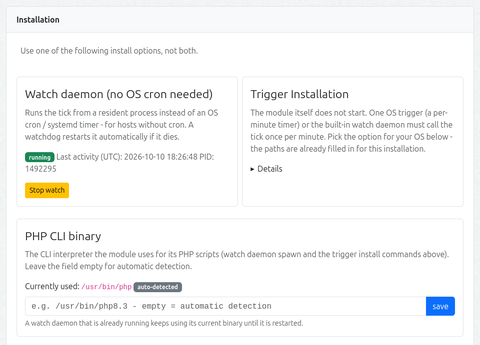
Important — PHP CLI binary: the admin page’s Installation accordion shows which PHP CLI interpreter is currently resolved (badge: auto-detected / manual path) and lets you pin a manual path. The chosen binary is used for the watch daemon spawn and in all generated trigger commands.
It is important to check whether your web server provides a PHP-CLI binary (SAPI) and whether the module is configured correctly to use it. Otherwise, tick will not work.
The tick is designed to run every 60 seconds. It makes an inventory of cron jobs, commands and events, triggers events and processes the task queue.
Pick one of the options shown in the module’s admin page:
Option A — classic cron
One line in the web server user’s crontab, runs every minute:
* * * * * cd "/path/to/webtrees" && mkdir -p data/cronjob && "/usr/bin/php" modules_v4/cronjob/cli/tick.php cron:tick >> "/path/to/webtrees/data/cronjob/tick.log" 2>&1
Option B — systemd timer
Two unit files (also shown in the admin page):
# /etc/systemd/system/cronjob-tick.service
[Unit]
Description=webtrees cronjob module tick (runs due maintenance jobs)

[Service]
Type=oneshot
User=<webserver-user>
WorkingDirectory="/path/to/webtrees"
ExecStart="/usr/bin/php" ./modules_v4/cronjob/cli/tick.php cron:tick
# /etc/systemd/system/cronjob-tick.timer
[Unit]
Description=Run the webtrees cronjob tick every minute

[Timer]
OnBootSec=1min
OnCalendar=*:*:00
Persistent=true

[Install]
WantedBy=timers.target
sudo systemctl daemon-reload
sudo systemctl enable --now cronjob-tick.timer
Option C — watch daemon (no OS timer)
Click Start watch on the admin page. A resident process runs the tick every 60 seconds, and a page-load watchdog respawns it if it dies. Use it when the host has no cron and no systemd access, or for testing — on Windows hosts this is the simplest option.
stateDiagram-v2
    [*] --> Stopped: (initial)
    Stopped --> Running: Start watch (Admin-UI)
    Running --> TickLoop: tick every 60 s
    TickLoop --> TickLoop: run job
    TickLoop --> Dead: ⚠ process dies
    Dead --> Running: 🔄 Watchdog respawn<br/>(next page load<br/>Cooldown 5 min)
    Running --> Stopped: Stop watch
    Dead --> Stopped: Stop watch<br/>(no respawn)

    note right of Running
        🔒 holds data/cronjob/watch.lock
        🆔 PID visible in Admin-UI
        🛡 survives FPM-Worker-Recycle (setsid)
    end note
Option D — Windows Task Scheduler
The admin page generates the XML with paths already filled in. Save it as wt-cronjob-tick.xml (UTF-8) and run schtasks /Create /F /XML wt-cronjob-tick.xml once in an elevated prompt.
3 - Admin settings
Webtrees module settings
Since this is a service module, the only way to access its functions is through the module settings page. Strictly speaking, the only settings available are:
- the optional path to the PHP CLI binary (if it is not automatically detected) and
- the option to enable additional debug logging in the error log.
Event catalog
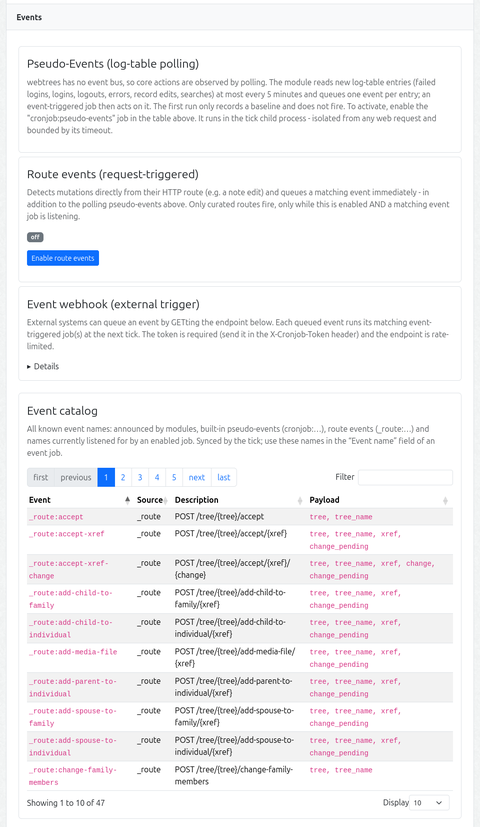
The admin page (Events section) and the job form’s event-name suggestions are fed by an event inventory (cj_event_catalog, synced by the tick like the job registry). It merges, in this priority order:
- events announced by modules (manifest
eventssection /getModuleEvents()), namespaced<module>:<name> - built-in pseudo-events (
cronjob:*, from the detectors) - route events (
_route:*, derived from the live route table) - event names currently listened for by an enabled event job (source
listening) — this covers webhook-only names
Each entry carries its source, a description (stored as a translation key, translated at render time only) and the known payload parameter names. For route events the payload is derived from the route path: the {param} placeholders in the order they appear, with {tree} expanding to tree + tree_name (mirroring what the live event payload carries). For pseudo-events both come from the detector (description() / payloadKeys()). The full list is also what the “Event name” datalist in the job form offers. The catalog is rendered as a client-side DataTables (sort/filter/paging) in the Events section.
Command catalog
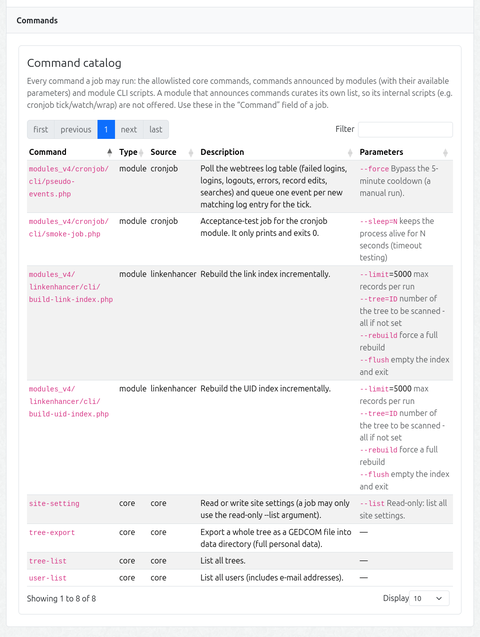
The job form’s command suggestions and the admin page (Events section) are fed by a command inventory (cj_command_catalog, synced by the tick like the others). It merges, in this priority order (first source wins per command):
- the allowlisted core commands (
tree-export,tree-list,user-list,site-setting), with their known parameters - commands announced by modules (manifest
commandssection /getModuleCommands()) — with a description and structured parameters - module CLI scripts found by glob (
modules_v4/<module>/cli/*.php), except for a module that announced commands (that module curates its own list, so its internal scripts are not offered)
Each entry carries its type (module / core), its source, a description (translation key, translated at render time) and the available parameters (structured: name, optional, default, description). In the job form, entering a command that matches an announced command shows its parameters as a hint under the field.
Failure notification
A job can be marked Notify on failure. When such a job fails (non-zero exit or timeout), the site’s administrator accounts are alerted through webtrees’ own MessageService::deliverMessage() — which delivers via the internal message system and/or e-mail according to each recipient’s own contact-method preference. No addresses are stored in the module and no channel is hardcoded: the recipients are the admin user accounts, and how they are reached follows the site’s messaging settings.
The notification carries the job name, status, exit code, duration and a short tail of the captured output. It runs in the tick (no web request), so it carries no link beyond the text. A notification problem never breaks the tick.