Admin settings
Since this is a service module, the only way to access its functions is through the module settings page. Strictly speaking, the only settings available are:
- the optional path to the PHP CLI binary (if it is not automatically detected) and
- the option to enable additional debug logging in the error log.
Event catalog
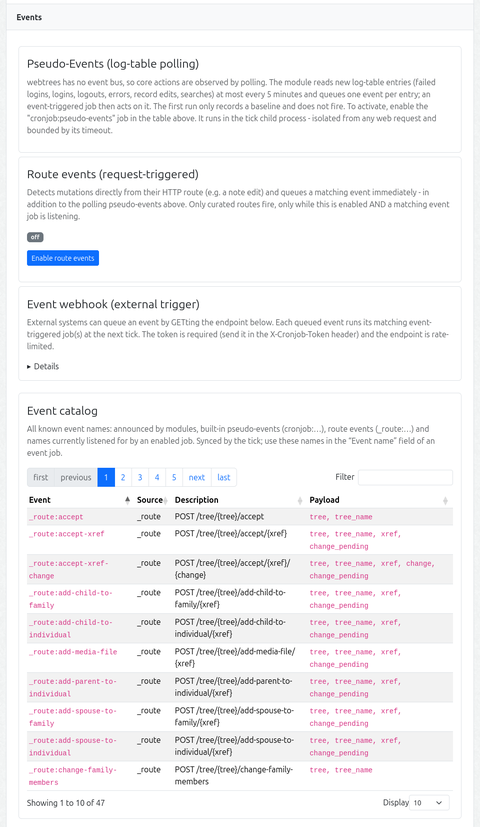
The admin page (Events section) and the job form’s event-name suggestions are fed by an event inventory (cj_event_catalog, synced by the tick like the job registry). It merges, in this priority order:
- events announced by modules (manifest
eventssection /getModuleEvents()), namespaced<module>:<name> - built-in pseudo-events (
cronjob:*, from the detectors) - route events (
_route:*, derived from the live route table) - event names currently listened for by an enabled event job (source
listening) — this covers webhook-only names
Each entry carries its source, a description (stored as a translation key, translated at render time only) and the known payload parameter names. For route events the payload is derived from the route path: the {param} placeholders in the order they appear, with {tree} expanding to tree + tree_name (mirroring what the live event payload carries). For pseudo-events both come from the detector (description() / payloadKeys()). The full list is also what the “Event name” datalist in the job form offers. The catalog is rendered as a client-side DataTables (sort/filter/paging) in the Events section.
Command catalog
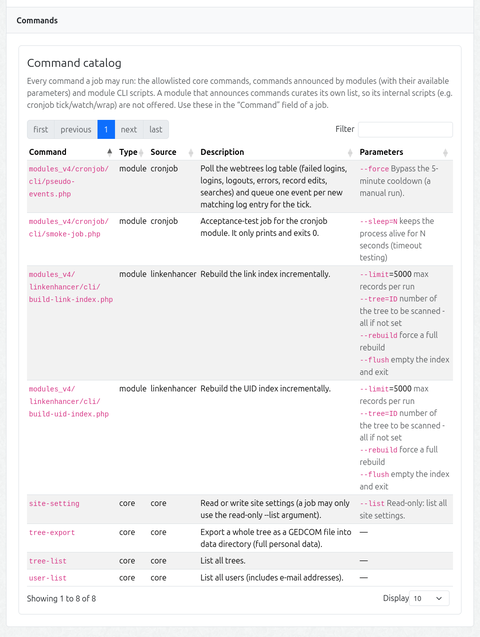
The job form’s command suggestions and the admin page (Events section) are fed by a command inventory (cj_command_catalog, synced by the tick like the others). It merges, in this priority order (first source wins per command):
- the allowlisted core commands (
tree-export,tree-list,user-list,site-setting), with their known parameters - commands announced by modules (manifest
commandssection /getModuleCommands()) — with a description and structured parameters - module CLI scripts found by glob (
modules_v4/<module>/cli/*.php), except for a module that announced commands (that module curates its own list, so its internal scripts are not offered)
Each entry carries its type (module / core), its source, a description (translation key, translated at render time) and the available parameters (structured: name, optional, default, description). In the job form, entering a command that matches an announced command shows its parameters as a hint under the field.
Failure notification
A job can be marked Notify on failure. When such a job fails (non-zero exit or timeout), the site’s administrator accounts are alerted through webtrees’ own MessageService::deliverMessage() — which delivers via the internal message system and/or e-mail according to each recipient’s own contact-method preference. No addresses are stored in the module and no channel is hardcoded: the recipients are the admin user accounts, and how they are reached follows the site’s messaging settings.
The notification carries the job name, status, exit code, duration and a short tail of the captured output. It runs in the tick (no web request), so it carries no link beyond the text. A notification problem never breaks the tick.