Usage
Creating jobs, run history, and the admin UI
Creating a job
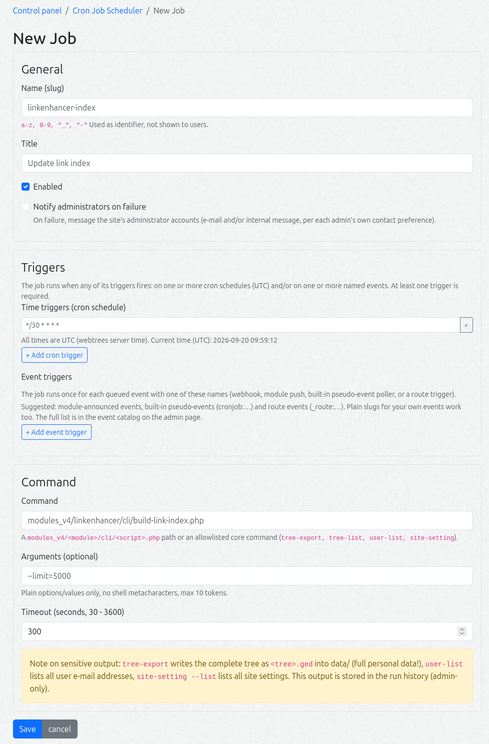
Control panel → Cron Job Scheduler → New Job:
| Field | Meaning |
|---|---|
| Name (slug) | technical identifier, a-z 0-9 _ -. Read-only for module-offered jobs (their <module>:<name> key is fixed); editable for jobs you create yourself. |
| Title | human readable name |
| Triggers | one or more time triggers (cron schedules) and/or event triggers — the job fires when any trigger fires. At least one is required. |
| Cron expression | (time trigger) standard 5-field cron or a macro (@daily, @weekly, …). Times are UTC. |
| Event name | (event trigger) the event this job reacts to. Slug or <domain>:slug, max 64 chars. |
| Command | a modules_v4/<module>/cli/<script>.php path or an allowlisted core command. |
| Arguments | plain options/values only (e.g. --limit=5000), max 10 tokens |
| Timeout | 30 - 3600 s |
| Notify on failure | opt-in: alert the administrator accounts when this job fails |
Available event names and commands are provided as datalists to make data entry easier.
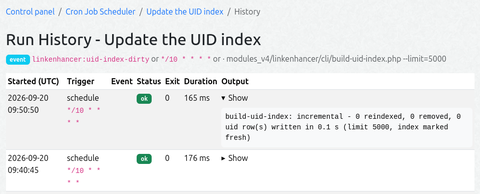
The Run now button queues the job for the next tick (≤ 60 s). The History page shows status, exit code, duration, the trigger that fired the run, and the captured output (last 64 KB) of the last 25 runs per job (plus a 30-day global retention window).
The job table is a client-side DataTable (search box, sortable columns, paging, state saved in the browser). The Enabled and Notify columns can be toggled in place. Per row: Duplicate (opens the create form prefilled) and Reset (restores module-offered defaults).