Cross-Reference Overview
Cross-reference overview with link index for large trees
Although webtrees replaces XREFs such as @I2@ in notes with a cross-reference and its appropriate display name, this is not very flexible. You can’t determine the display name, which means that in the event of an error (due to XREF renumbering or typing error), it is not easy or possible to resolve the cross-reference to the corresponding data record without any doubt.
Tip: The custom module webtrees-mitalteli-show-xref can help you find the XREF and UID reference of personal data records. Some UIDs (38 characters length) are automatically shortened by webtrees in the standard view — this module shows the unchanged UIDs.
The enhanced links function is implemented via JavaScript and searches in the rendered output of webtrees for <a> tags whose href attribute values begin with #@. This way it is possible to handle links in markdown and HTML markup. Because it is processed in the browser on the client side, the existence of the cross-referenced data records in webtrees is not checked in advance. Errors only occur when the link is clicked (e.g. if the access to the resource is restricted).
As a bonus, different destinations can be addressed with one link definition, whereby the cross-reference is always the first link (if set) and the others are represented by attached clickable icons only.
The parameter keys are listed in parentheses:
Each parameter key can be specified multiple times — but you shouldn’t overdo it for the sake of clarity.
Additional external destinations can be configured on the Admin page.
Markdown: An enhanced link looks like this [Link display title](#@param1¶mN), so that one or more targets can be addressed at once. For cross-references in webtrees a record reference (REF can be the XREF or a UID) is expected:
wt=@REF@ or wt=@REF@othertree — standard link, access to record page via redirect URLwt=n@REF@ — legacy link with given record type (here: to a note with REF in the current tree)i=individual, f=family, s=source, r=repository, n=note, l=sharedPlacewt=i@REF@othertree+dia — link to record type individual with REF from tree “othertree” and also link to Interactive tree of this personHTML: The same applies to HTML links: <a href="#@wt=i@I1@">Link display title</a>
This is also usable in cooperation with the name badge function of the Vesta Classic Look & Feel module in the HTML snippet field: <a href="#@fsft=<ref/>"></a> for linking to a record in the Family Search Family Tree. It’s also possible to embed those links in news articles of Tywed’s news-menu module or in FAQ articles.
The syntax of the external targets is listed by the markdown help function of this module. In most cases, only one key-value parameter pair needs to be specified, consisting of the short name of the desired target and the ID of the data record located there.
In the upper part of the image we can see the edit mode of a note record, below how it is rendered in view mode:
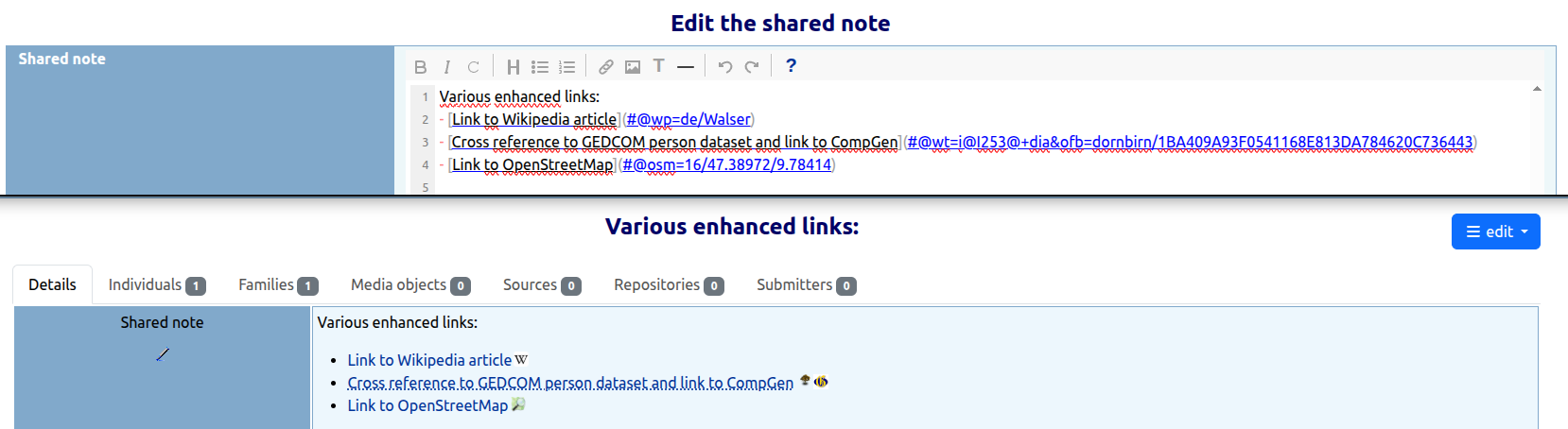
Cross-reference overview with link index for large trees
Renumber XREFs with automatic link repair
Data-fix handlers for link integrity issues