Cross-Reference Overview
There are three types of overviews:
- overview about all data for the admin (admin overview),
- to one tree limited overview (user overview), and
- record-specific overview on the record details view (record overview, as tab or modal).
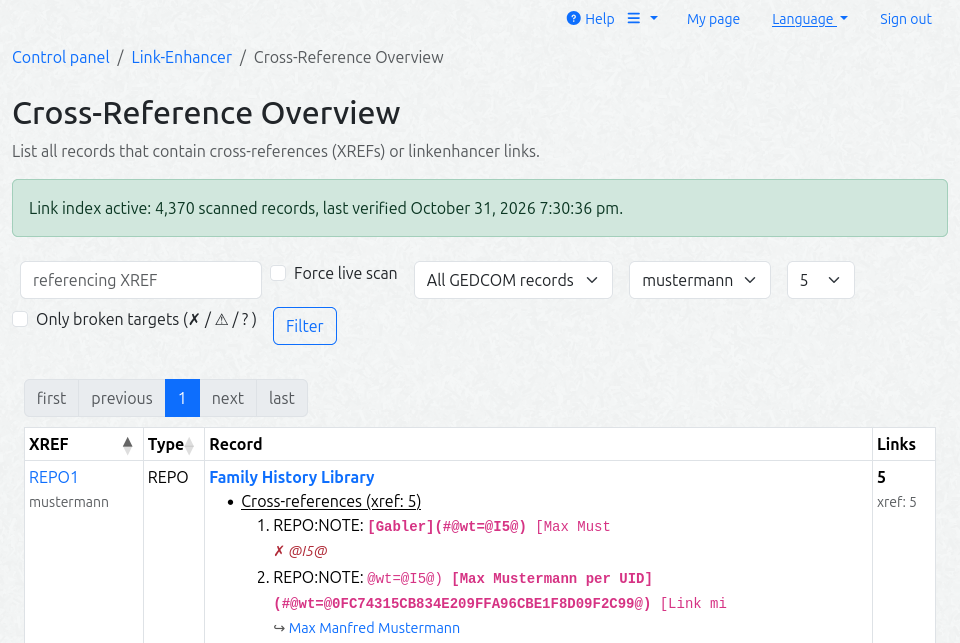
The admin overview (Control panel → LinkEnhancer → Cross-reference overview) is a server-side paginated DataTable. It lists all records that contain classic @XREF@ cross-references or linkenhancer links, with a per-record link inventory.
Optional filters:
- referenced XREF (only available while a fresh link index is active — in live-scan mode the field is hidden, because it would only be a coarse pre-filter there — no classic references are found),
- record type,
- tree, and
- the number of tokens shown per link class (all / 5 / 10 / 20, default 5).
The XREF cell shows the tree name as a second muted line; the type is its own sortable column. Each inventory token is displayed as a short display context (snippet) with the link token itself in bold.
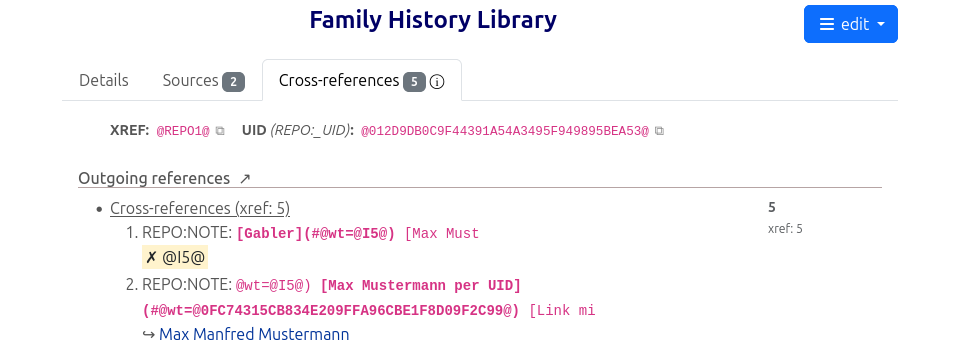
Optionally you can enable a user overview per tree and a record overview with incoming and outgoing references per GEDCOM record. The record overview also displays the XREF and, if applicable, the UIDs of the record, so that these references can be more easily copied into notes.
Supported engines
| Live overview | Link index (CLI) | |
|---|---|---|
| MariaDB / MySQL | yes (REGEXP gate) | yes |
| PostgreSQL | yes (REGEXP gate) | yes |
| SQLite / SQL Server | limited mode — automatic fallback to a coarse LIKE gate + full table scan per request (banner on the page); the exact classification still happens in PHP | not available (needs REGEXP + MD5) — the CLI exits with an error |
How it works
On large trees the live regex scan over the GEDCOM tables can be slow, so the page can instead read a link index made of three module tables (the Developer / Project Structure section contains more details about the database schema):
le_record_scan— one row per scanned record with an MD5 fingerprint of the record textle_link_index— one row per (link, target) found in the record (the display context captured at build time) — the foundation for displaying incoming cross-references in the record overviewle_index_meta— single row — the state of the last complete index run
flowchart TD
    CLI["🛠 cli/build-link-index.php<br/>Cron: */30 * * * *"]

    subgraph Scan["🔍 Incremental scan"]
        FP["MD5 Fingerprint<br/>per record"]
        DIFF{"🔀 Changed?<br/>(new / removed)"}
    end

    subgraph Tables["💾 Tables"]
        RS[("le_record_scan<br/>file, xref, hash")]
        LI[("le_link_index<br/>token, target, snippet")]
        META[("le_index_meta<br/>last_run, rows")]
    end

    PAGE["📄 XREF Overview Page"]

    CLI --> Scan
    FP --> DIFF
    DIFF -->|✅ yes| SCAN["PHP Scan<br/>(XrefsService)"]
    DIFF -->|⏭ no| SKIP["skip"]
    SCAN --> RS
    SCAN --> LI
    CLI --> META

    META -->|"🟢 fresh (< 2 h)"| PAGE
    META -->|"🟠 stale"| LIVE["Live Regex Scan"]
    LIVE --> PAGE

    classDef scanStyle fill:#e3f2fd,stroke:#1565C0,stroke-width:2px
    classDef tablesStyle fill:#e8f5e9,stroke:#2E7D32,stroke-width:2px
    classDef decideStyle fill:#fff3e0,stroke:#E65100,stroke-width:2px
    classDef pageStyle fill:#fce4ec,stroke:#C2185B,stroke-width:2px

    class FP scanStyle
    class RS,LI,META tablesStyle
    class DIFF decideStyle
    class PAGE pageStyle
The index is maintained by build-link-index.php
:
- Initial build (first run, or
--rebuild): both index tables are reset, all scan rows are created server-side in one bulk statement per GEDCOM table (fast, zero row transfer), and only the records that pass the link pre-filter are scanned in PHP. The initial build is a one-time cost — use a higher--limitfor it. If it is interrupted by--limit, the next run converges (the build is idempotent). - Incremental runs (the normal cron case): only records whose MD5 fingerprint changed — or which were added/removed — are re-scanned (cursor chunked), so the job stays cheap even on large sites.
Cron example (every 30 minutes, up to 2000 records per run):
*/30 * * * * cd /path/to/webtrees && php modules_v4/linkenhancer/cli/build-link-index.php --limit=2000 >> /var/log/linkenhancer-index.log 2>&1
Only a full run (without --tree) that is not cut by --limit marks the index fresh (le_index_meta.last_run). A run cut by --limit continues where it stopped; a --tree run only refreshes that tree.
Flushing
--flush empties the index tables and exits (no rebuild) — for testing (force the page onto the live scan) and maintenance (clean restart, broken index):
php modules_v4/linkenhancer/cli/build-link-index.php --flush            # all trees
php modules_v4/linkenhancer/cli/build-link-index.php --flush --tree=5   # only tree 5
The freshness flag is always reset, so the page reliably falls back to the live scan afterwards. The next full run is an initial build again (full re-scan cost). --flush combined with --rebuild is redundant — --rebuild already resets and rebuilds.
What counts as a link
The overview and the index use one shared pre-filter (single source: XrefsService::linkPrefilterPatterns()):
NOTE(level >= 1) with an@XREF@or a](#@link, with content on the same line. A NOTE value that is exactly one reference (1 NOTE @N5@) is a GEDCOM shared-note pointer — a structural reference, not a text link, and is not listed.CONC/CONT/TEXT/_TODOwith an@XREF@(naked is a link) or a](#@link- an LE link may carry an optional
id=@XREF@parameter (at most one, the position among the parameters does not matter) — like thewt=parameters it is indexed as a link target - a shared note’s own level-0 text (
0 @N1@ NOTE …) - matching is line-based (no cross-line matches), on the same lines the collector reads
The page shows which source it uses:
- index active (green note): a full, complete index run finished less than 2 hours ago (default;
XrefsService::INDEX_FRESH_SECONDS) - live scan (blue note): no fresh index — the page falls back to the live scan
- limited mode (yellow note, SQLite/SQL Server): see the engine table above
Use p1-measure.php
(read-only) on your instance to check how expensive the live scan is for your data and to calibrate the cron schedule.